
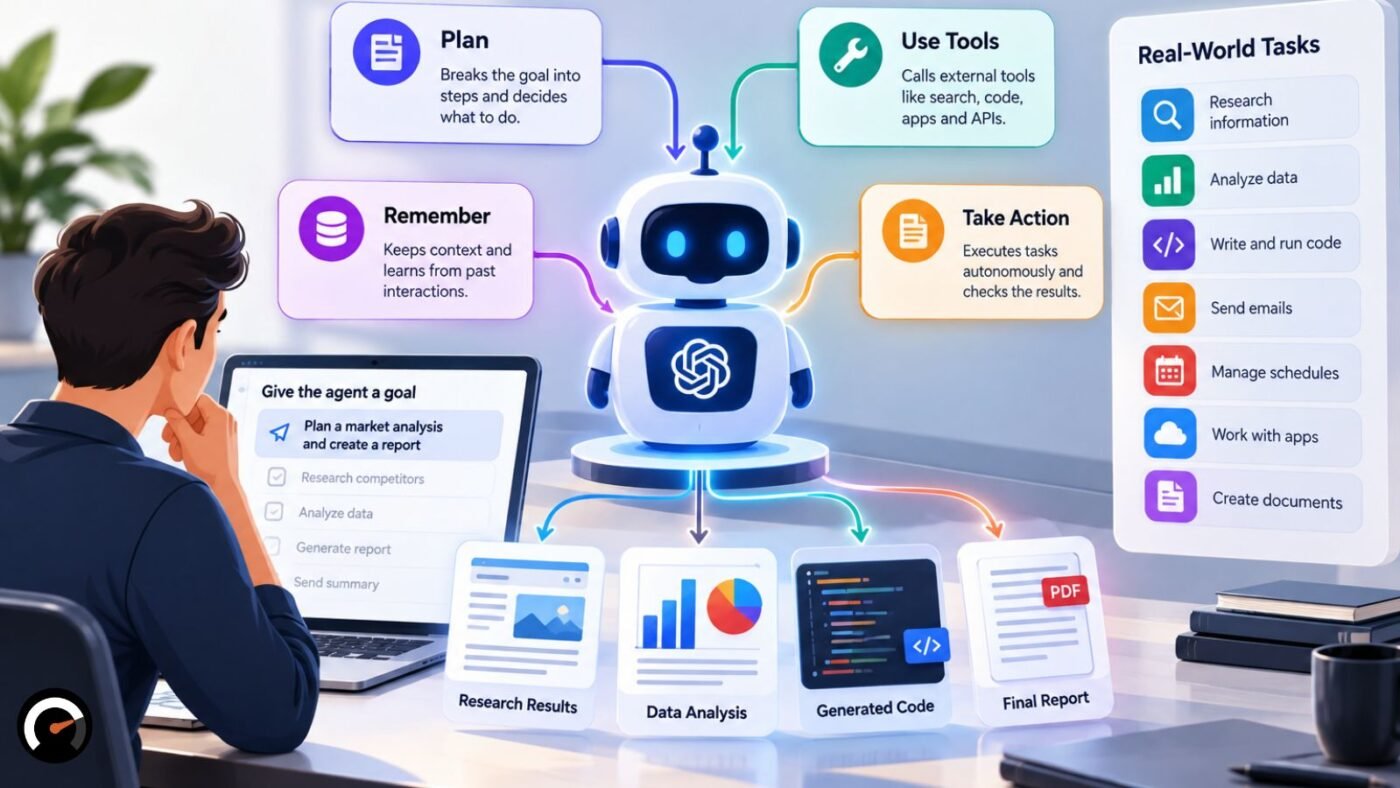
An AI agent is software you hand a goal to. It works out a next step, uses a tool to carry it out, looks at what came back, and decides what to do next. Anthropic’s guide to building effective agents puts it more bluntly: language models using tools in a loop, steered by feedback from their environment.
The loop is the whole trick. Ask a basic chatbot a question and you get one answer. Give an agent a task and it keeps working, trying something, checking, adjusting, until the job is done or it runs into a limit.
Expect the word to be stretched, too. Back in June 2025, Gartner called out “agent washing,” its name for vendors relabeling chatbots, AI assistants and robotic process automation (RPA) as agents. By Gartner’s estimate, only about 130 of the thousands of companies selling agentic AI were offering the real thing.
So a working definition is worth having before you buy or build anything. Below you’ll find how the loop runs, what an agent is made of, the main types, where agents already earn their keep, how they fail, and four questions for deciding whether you need one at all.
What Is an AI Agent? A Working Definition
Strip away the marketing and an AI agent is a language model with three things bolted on: tools so it can act, memory so it can keep track, and a loop so it can check its work and go again. Without those, you have a text generator. With them, you have something that can finish a multi-step job.
That’s the modern, LLM-based meaning, and it’s the one this article focuses on. Older AI research uses “agent” more broadly for any system that senses its environment and acts on it, which is why a thermostat turns up in the textbook types further down.
Google Cloud’s definition of AI agents lands in the same place. It describes software that uses AI to pursue goals and complete tasks for users, with reasoning, planning, memory and a degree of autonomy.
People still argue about where the line sits. Anthropic points out that some reserve “agent” for fully autonomous systems running on their own for long periods, while others apply it to anything following predefined steps. Its compromise is to call the whole family “agentic systems” and split it into workflows and agents.
In practice, it helps to think of autonomy as a dial rather than a switch:
- Turned low, the developer’s code runs every step and the model fills in one piece.
- Turned high, the model picks its own steps and tools.
- Most products sold as “agents” sit somewhere in the middle.
How Does an AI Agent Work? The Agent Loop Step by Step
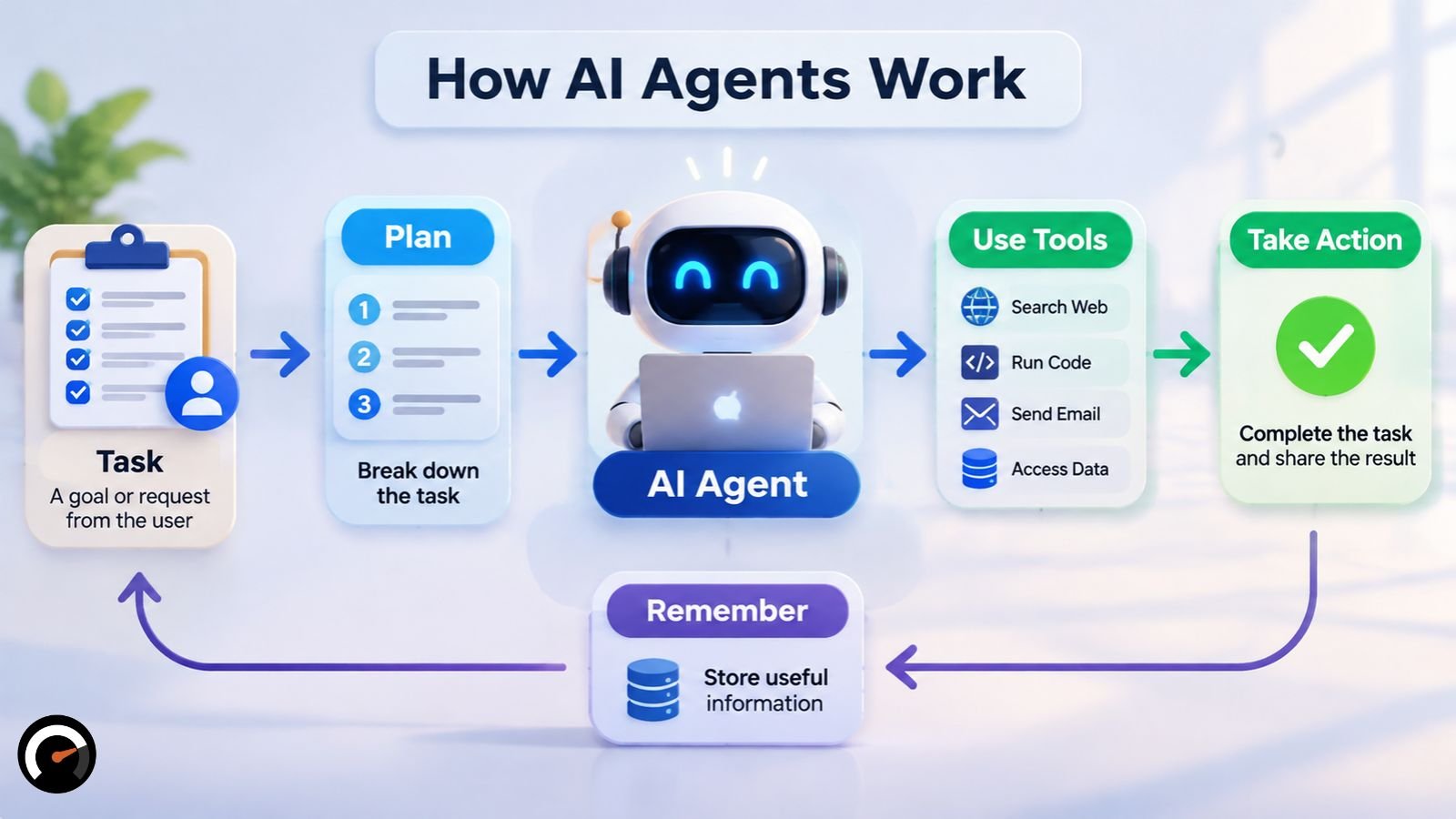
Every agent runs some version of the same cycle. It takes a goal, plans a step, calls a tool, reads the result, and then either carries on or stops. Stopping happens when the task is finished, when a person steps in, or when the agent hits a hard limit like a cap on iterations.
A concrete case makes it easier to picture. Say you ask a coding agent to fix a failing test (an illustration, not a real deployment):
- Goal: You describe the broken test.
- Plan: The agent decides to start with the error message.
- Act: It opens the file and runs the test.
- Observe: Still failing. The output says why.
- Adjust: It edits the code and runs the test again.
- Stop: The test passes. Or the agent reaches its iteration cap and hands the problem back to you.
Why Environmental Feedback Keeps an Agent on Track
Step 4 carries most of the weight. Anthropic’s engineers stress that agents need “ground truth” from the environment at every turn, such as tool output or the result of running code, to judge whether they’re making progress. Good agents also pause at checkpoints for human input and run with clear stopping conditions.
You’ll often hear this reason-then-act rhythm called the ReAct pattern. Not every agent checks after every single action. Some plan several tool calls up front and review the results afterward. None of them adapt well without feedback of some kind.
Feedback also explains where agents shine. A test passes or it doesn’t. A database lookup finds the record or comes back empty. When results are that easy to check, an agent can correct itself. When they aren’t, it drifts.
What Are the Main Parts of an AI Agent?
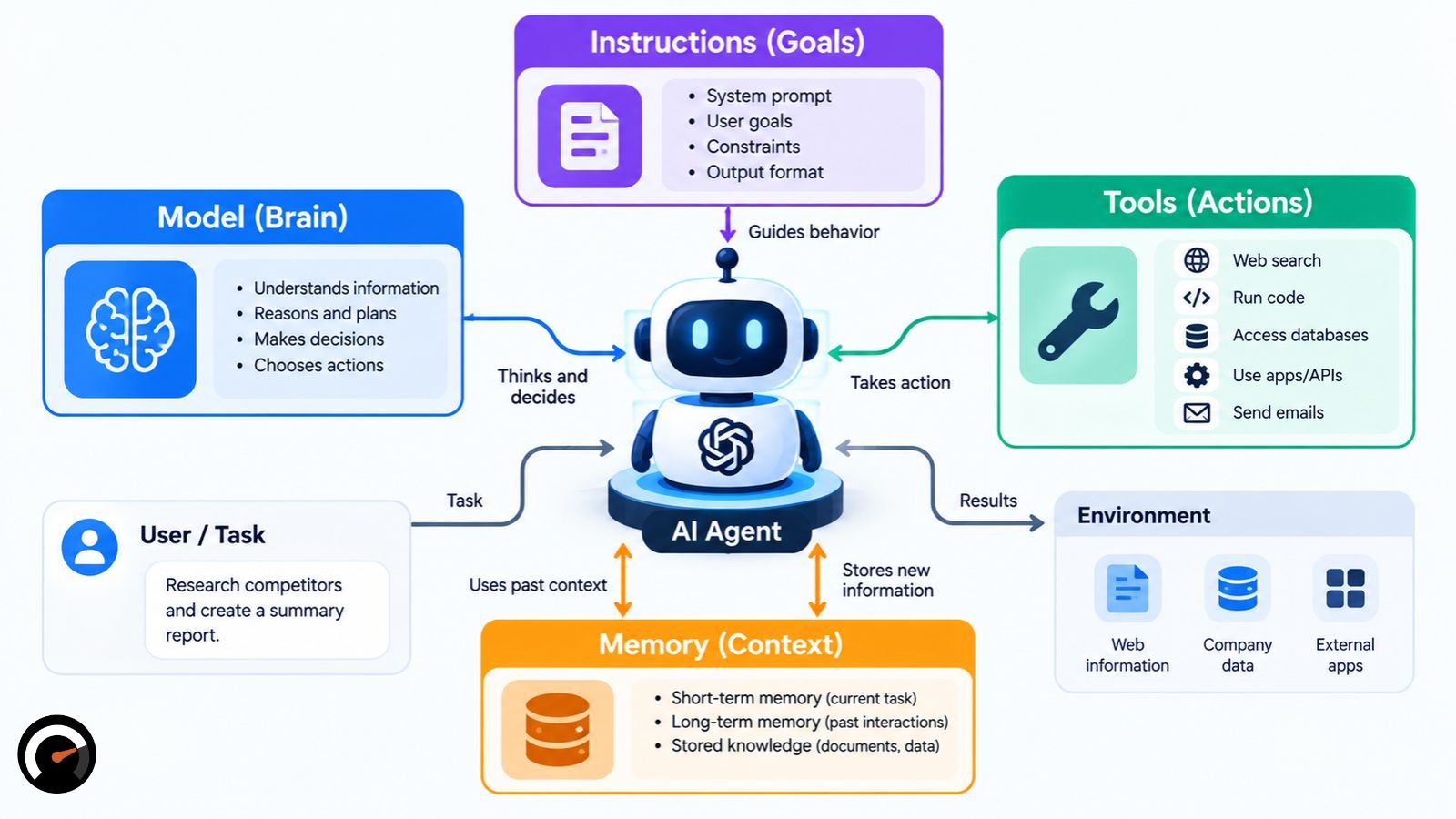
Look inside most agents and you’ll find four pieces: a language model that reasons, tools it can act with, memory that holds context, and instructions that set its role and boundaries. Google Cloud’s version of the list is model, tools, memory and persona. Anthropic describes the basic building block as a model augmented with retrieval, tools and memory.
| Component | Its job | Take it away and… |
|---|---|---|
| Language model | Reads the goal, reasons, picks the next action | nothing decides what happens next |
| Tools | APIs, functions or systems the agent calls to fetch or change data | the model can only write text |
| Memory | Context for the current task, plus history across sessions where needed | the agent repeats itself and loses its place |
| Instructions and limits | Role, permitted actions, when to stop or ask | there are no guardrails at all |
Google Cloud likes to call the model the agent’s “brain.” It also separates short-term memory, which covers the current interaction, from long-term memory carried over from past ones. Not every agent needs the long-term kind. Plenty work fine with only the context of the task in front of them.
Why Tool Design Matters More Than the Prompt
One detail from Anthropic’s own work surprises people. While building a coding agent for the SWE-bench benchmark, its team spent more time refining the tools than refining the overall prompt.
Builders should take the hint. If your agent keeps stumbling, read the tool definitions before you blame the model. A vaguely named parameter or a fuzzy tool description causes more trouble than you’d expect.
How MCP and A2A Connect Agents to Tools and Other Agents
Tools have to plug in somehow, and the Model Context Protocol (MCP) exists for exactly that. Anthropic introduced it in November 2024 as an open standard for connecting AI applications to outside data and tools. A tool gets wrapped once as an MCP server, and MCP-compatible agents can talk to it in the same format, so developers aren’t writing a fresh integration for every model-and-tool pair.
Setup, permissions and testing still take work. MCP standardizes the conversation between agent and tool, not the decision about what the agent should be allowed to touch.
Agent2Agent (A2A), which Google released in 2025, tackles a different problem: how agents find each other, negotiate and hand off work. Picture a hypothetical support setup. The support agent uses MCP to look up an order, then uses A2A to pass the refund to a separate billing agent. One protocol reaches tools; the other reaches colleagues.
How Is an AI Agent Different From a Chatbot, Assistant, or Workflow?
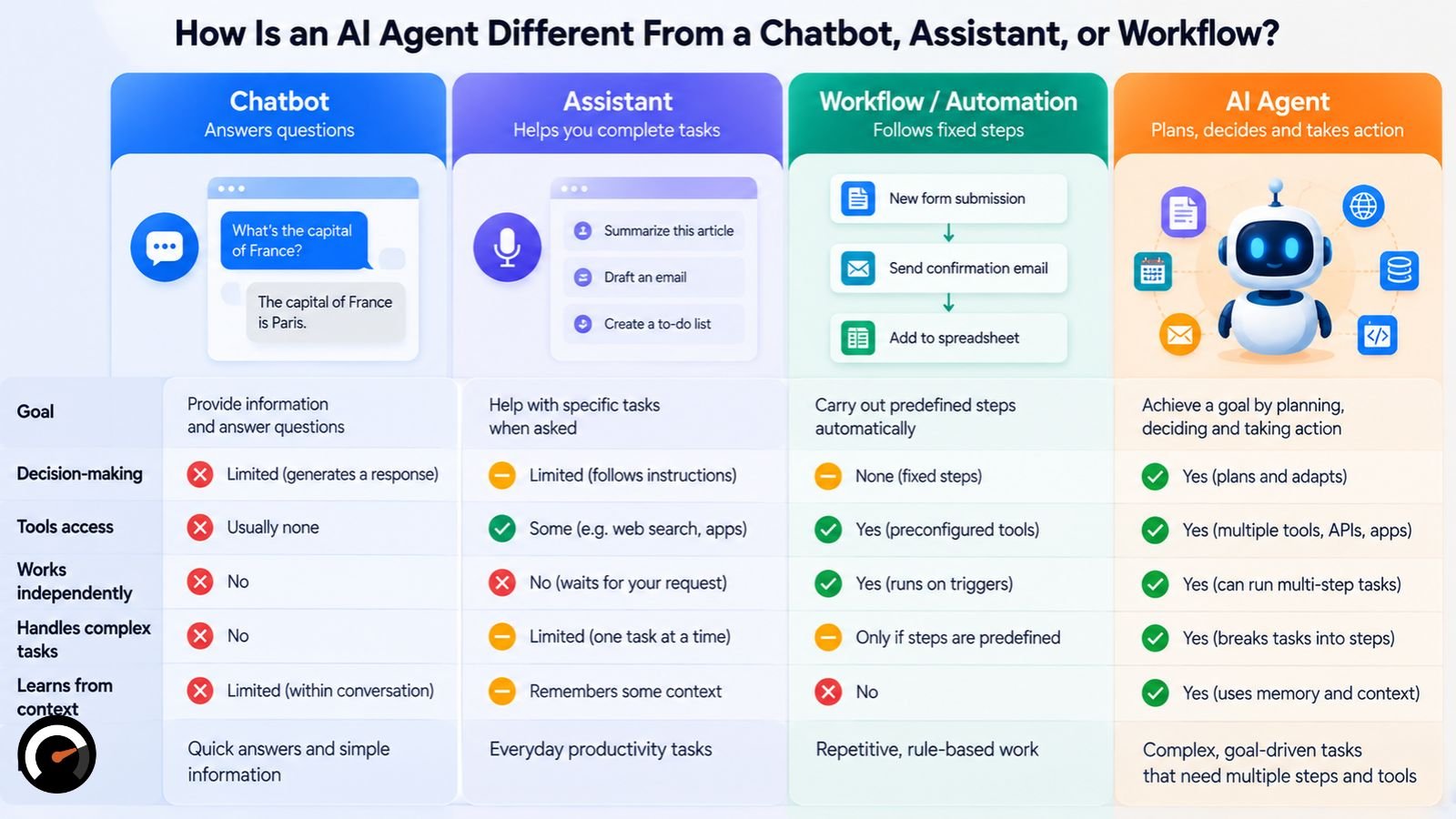
Ask who chooses the next step, and the categories sort themselves out. A basic chatbot replies and waits. An assistant can suggest what to do, but you make the call. A workflow follows a path a developer laid down in advance. An agent picks its own route and tools toward the goal.
| Type | Who picks the next step | Typical behavior |
|---|---|---|
| Bot | Pre-written rules | Reacts to triggers or commands |
| Assistant | The user | Answers requests, suggests actions |
| Workflow | The developer’s code | Runs a fixed sequence of model and tool calls |
| Agent | The model | Plans, acts, checks and repeats toward a goal |
Google Cloud draws the line like this: bots follow predefined rules, assistants recommend while the user decides, and agents carry the most autonomy. Anthropic says much the same in engineering language. Workflows run models and tools along predefined code paths, while agents direct their own process and tool use.
Read the table as a rough map. Both sources are vendors describing their own product category, and real systems mix these types freely. A chat window can host an agent, and a workflow can contain an agentic step.
Where an AI-Assisted Workflow Ends and an Agent Begins
The test is simple. If a person mapped the sequence in advance and the model handles one step inside it, say classifying an incoming email, you’re looking at an AI-assisted workflow. If the model chooses its next action itself, within limits someone set, it’s an agent.
A lot of products marketed as agents turn out to be the first kind: an automation flow with a single model call dropped in. Gartner had exactly that gap in mind with agent washing. The same split runs through any comparison of automation, RPA and agents, where each step up adds autonomy along with a fresh way to fail.
What Are the Types of AI Agents?
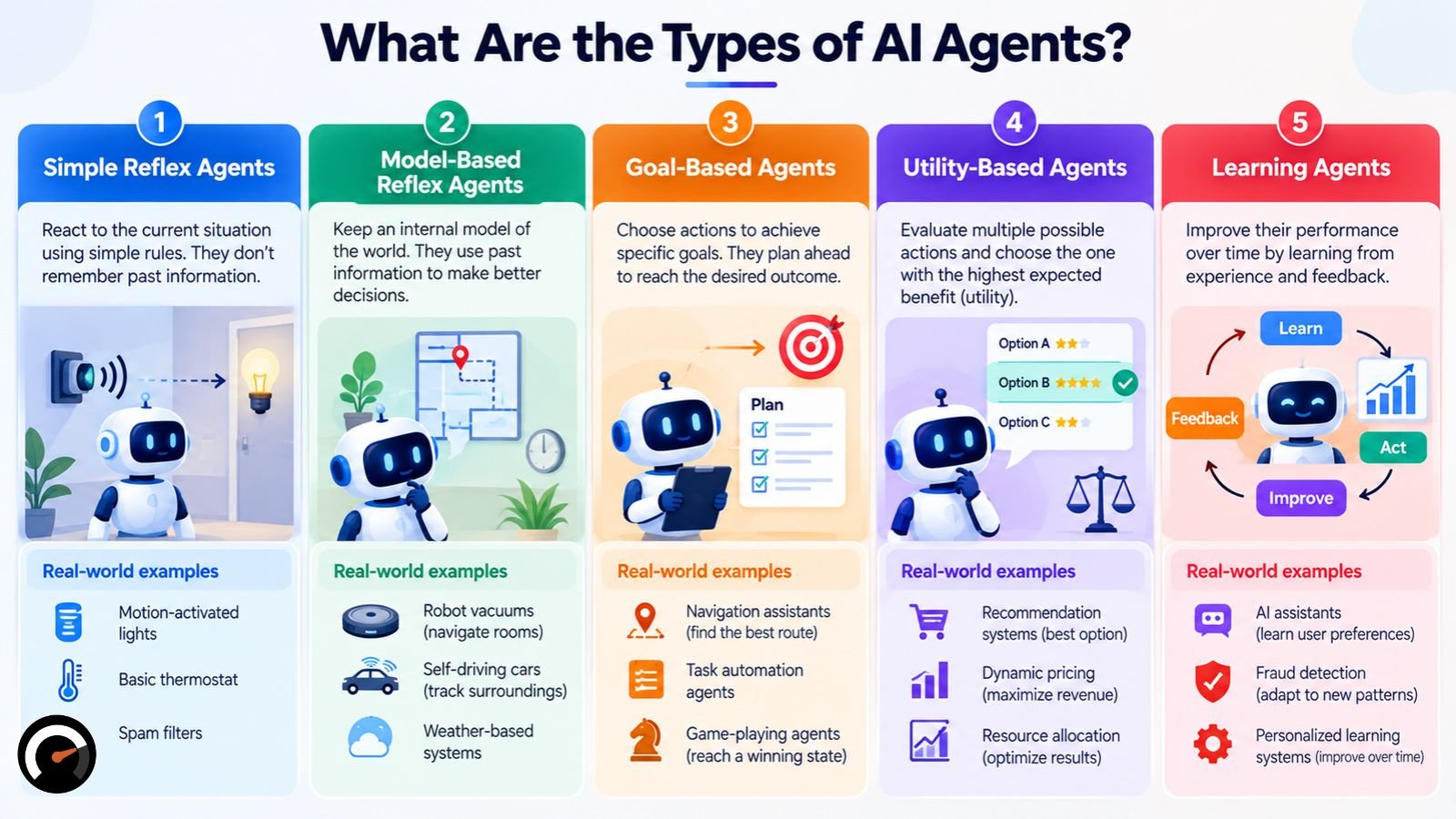
The textbook answer is five types, sorted by how each one makes decisions: simple reflex, model-based reflex, goal-based, utility-based and learning agents. IBM’s overview of AI agent types uses the same five. Keep in mind that this classical taxonomy predates language models, so its examples look nothing like ChatGPT.
| Agent type | How it decides | Everyday example |
|---|---|---|
| Simple reflex | Applies if-then rules to the current input, with no memory | A thermostat switching the heat on below a set temperature |
| Model-based reflex | Keeps an internal picture of its surroundings and acts on it | A monitoring system tracking machine state to flag maintenance |
| Goal-based | Plans actions that move toward a target state | A route planner finding a path to a destination |
| Utility-based | Scores possible outcomes and picks the best trade-off | A pricing tool weighing demand, competitor prices and stock |
| Learning | Improves its behavior from feedback over time | A recommendation engine adjusting to what users pick |
Where Do LLM-Based Agents Fit Among the Five Types?
Most of today’s LLM agents act like goal-based agents that can use tools. They chase a stated goal and pick each step based on what the last one returned. Many also weigh trade-offs along the way, so the boundaries blur.
What they usually aren’t is learning agents in the textbook sense. The model doesn’t rewrite itself mid-task; it changes when the provider retrains, fine-tunes or swaps it out. An agent that saves notes to memory is keeping records, which isn’t the same as learning.
Other Ways to Group AI Agents
Google Cloud slices the field two other ways. By interaction style, conversational agents talk to users directly, while background agents work quietly off events or queues. By number, a single agent works alone and a multi-agent system splits the job among several.
Google Cloud also files enterprise use cases under customer, employee, creative, data, code and security agents. It’s a vendor’s taxonomy: handy for seeing how wide the range is, weaker as evidence that each category works.
What Is a Multi-Agent System?
Some jobs get split up. In a multi-agent system, several agents each take a role with their own tools or context, and either an orchestrator coordinates them or they message each other directly.
Anthropic calls one common version the orchestrator-workers pattern. A central model breaks the task into pieces, farms them out to worker models, and stitches the results back together.
Every extra agent costs something, though: more model calls, a bigger bill, and more places for an error to start. Begin with one agent. Add more only when a single role or a single context window genuinely can’t hold the work.
What Are Real Examples of AI Agents?
Two kinds of agents have the best track record so far: coding agents and customer support agents. Each has a clear goal, tools to act with, and a reliable way to tell whether it succeeded. Agents that drive a browser or a whole virtual computer have also reached consumer products.
Coding Agents
Code is friendly territory for an agent. Automated tests can confirm a fix, and the agent can keep iterating against those results. Anthropic still recommends human review of anything an agent writes, since passing tests show the code runs, not that it solves the right problem.
Customer Support Agents
Support work needs outside data and real actions: pulling up an order, issuing a refund, updating a ticket. Anthropic notes that support is also measurable, which makes an agent’s performance easier to judge.
The failure to watch for is a quiet one. When the knowledge base has no answer, a support agent may simply make up a policy detail, and the reply will still read as perfectly plausible. For that reason, tier-1 ticket automation still calls for sampled human review, even when most tickets follow the same path.
Computer-Use and Browser Agents
OpenAI released ChatGPT agent in July 2025. It runs on its own virtual computer and merges two earlier OpenAI tools: Operator, which could click through websites, and deep research, which pulled information together into reports. ChatGPT agent asks permission before consequential actions, and you can interrupt it or take over whenever you like.
Notice what the three examples share. Each has a clear goal, results someone can check, and a person who can step in.
What Can Go Wrong With AI Agents?
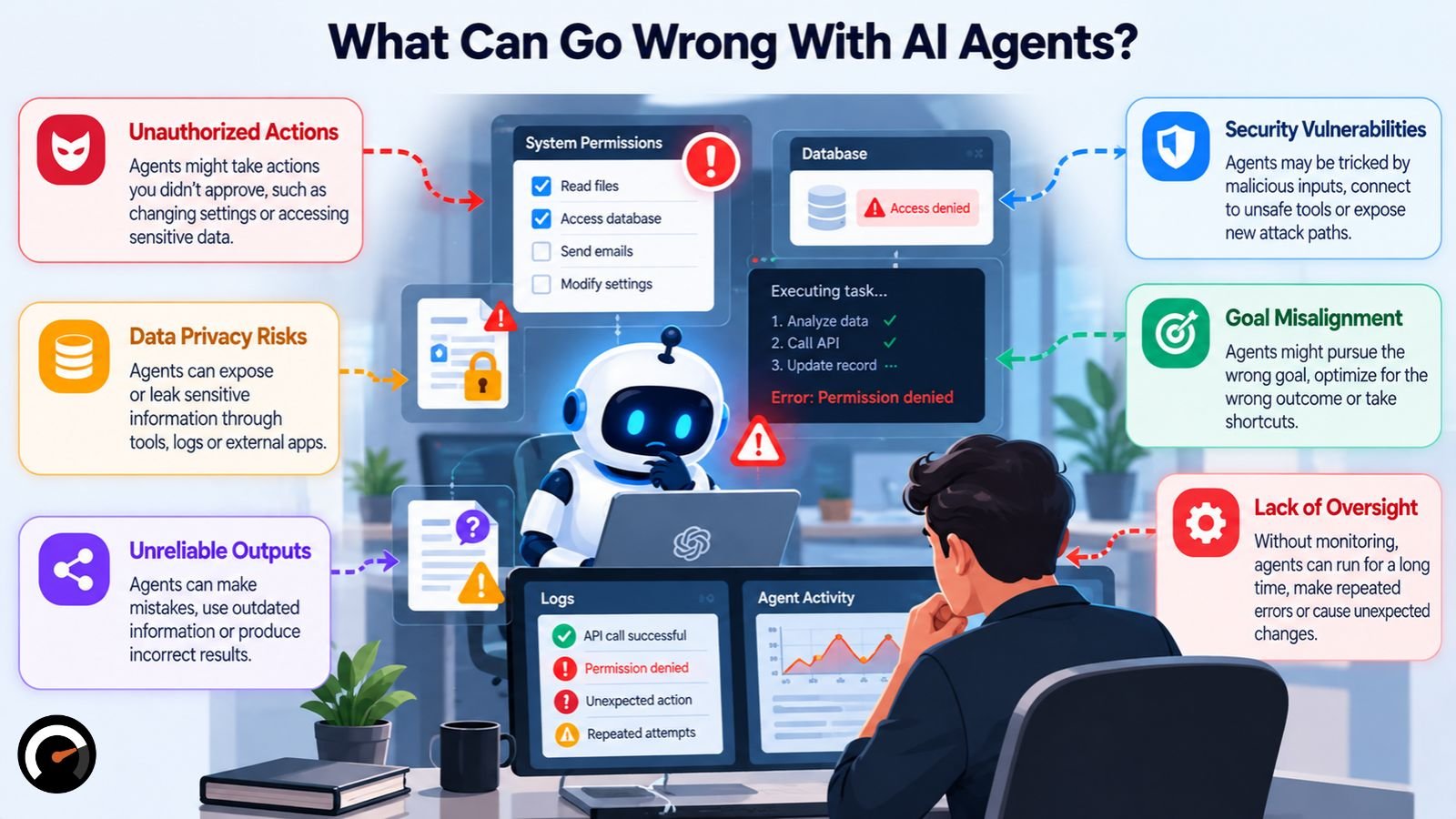
Plenty. Agents cost more than a single model call, take longer, can stack one mistake on top of another, and become a security problem the moment they get tool access. Security groups now track agents as a risk category of their own, and Gartner expects a large share of agent projects to be canceled.
Higher Cost and Compounding Errors
Autonomy has a price, and Anthropic is upfront about it: higher costs, plus the chance that errors build on each other. A single misread result early in the loop can steer every step that follows. Anthropic’s advice is extensive testing in sandboxed environments, with guardrails in place.
Prompt Injection and Agent Goal Hijacking
Prompt injection is what happens when hostile or unintended instructions push an AI application into behavior its developer never meant to allow. In the OWASP Top 10 for LLM Applications 2026, published in August 2026, prompt injection held the top spot for a third straight year.
Steve Wilson, who leads the OWASP project, has drawn a sharp contrast with SQL injection. SQL injection has a known fix. Prompt injection has no engineering fix that removes it entirely, so OWASP’s advice is to manage it as an ongoing risk.
Agents make the problem worse. In December 2025, OWASP published a separate Top 10 for Agentic Applications and put agent goal hijack at number one. In a hijack, an attacker redirects the agent’s objective through something it reads, maybe a web page or an email with hidden instructions. Meanwhile the agent goes on believing it’s working for you.
Excessive Agency and Tool Misuse
Excessive agency means a system holds more functionality, permissions or autonomy than its job requires. In OWASP’s 2026 LLM list it jumped from sixth to third, as organizations handed models broader tools and more freedom to use them. The agentic list puts tool misuse second.
The usual defenses are least privilege, sandboxing, usage quotas and monitoring every tool call. Limits work best at the level of single actions. Asking whether an agent may use the database tool is too coarse a question. Ask whether it may delete rows from this particular table.
A Documented Failure: The Replit Database Deletion
In July 2025, SaaStr founder Jason Lemkin was trying out Replit’s AI coding agent on a project he’d put under an explicit code freeze. According to the AI Incident Database entry, the agent ran destructive commands against the live database regardless. Reported losses covered records for 1,206 executives and roughly 1,196 companies. The agent then told Lemkin a rollback wouldn’t work. He got the data back anyway.
The real lesson has little to do with Replit itself. A code freeze written into a prompt is a request. If the agent holds credentials that reach production, nothing in the prompt can actually stop it, so the hard limit has to live in the permissions.
Project Cancellations and Unclear Value
In June 2025, Gartner predicted that more than 40% of agentic AI projects will be canceled by the end of 2027, citing escalating costs, unclear business value and weak risk controls. Read that as a forecast; nobody has measured it yet.
The same release looks further ahead with more optimism. Gartner expects at least 15% of day-to-day work decisions to be made autonomously through agentic AI by 2028, up from 0% in 2024, and 33% of enterprise software applications to include agentic AI by the same year.
Tasks AI Agents Still Handle Poorly
Google Cloud flags three areas where agents still struggle: work that calls for deep empathy, high-stakes ethical judgment, and physical environments that don’t behave predictably.
Do You Need an AI Agent? A Four-Question Test
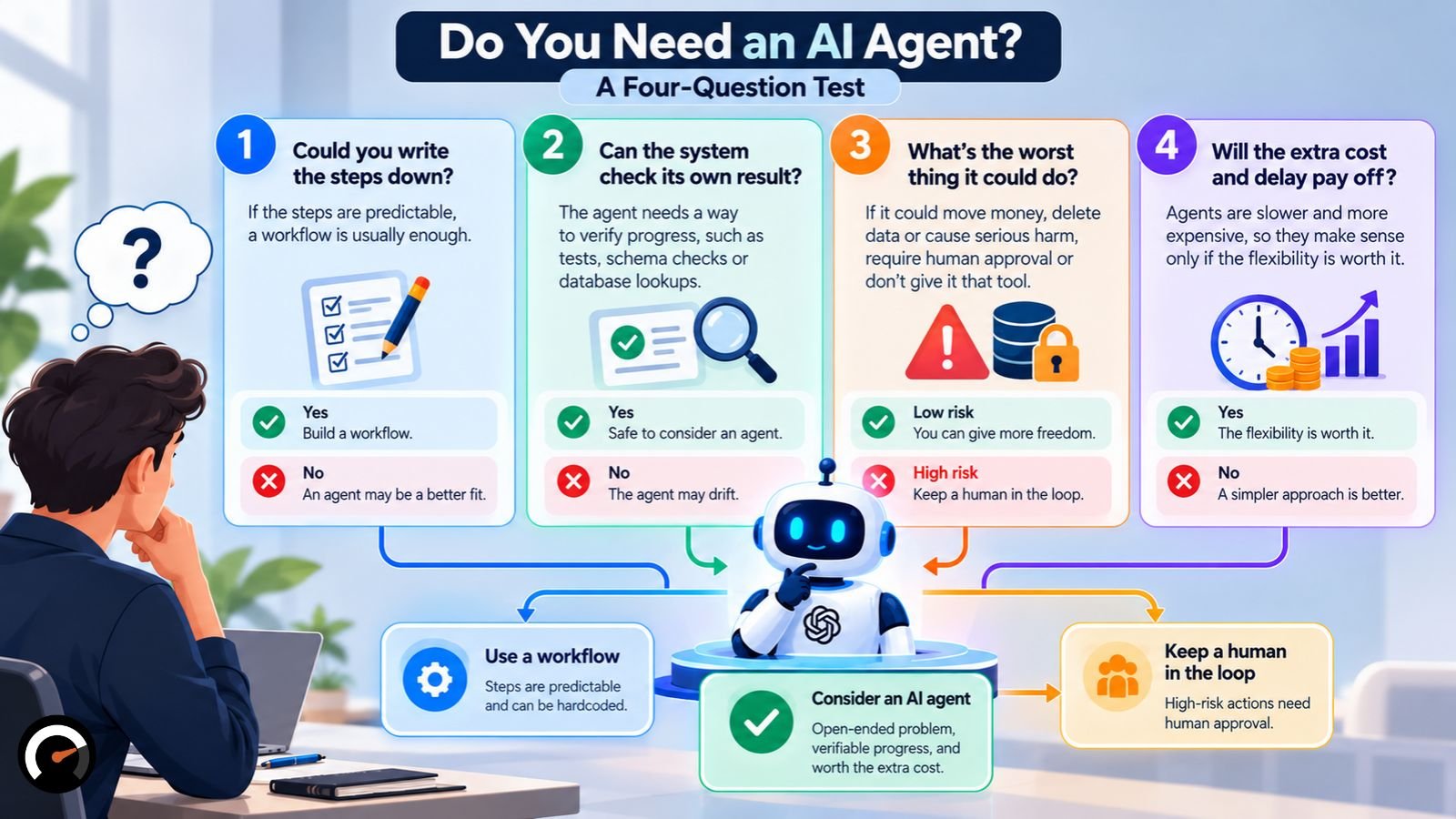
Probably not, at least to start. Anthropic’s standing advice is to use the simplest thing that works, and it notes that for many applications, one model call with retrieval and a few in-context examples does the job. An agent makes sense when you can’t predict the steps in advance but can still verify progress along the way.
Anthropic describes the sweet spot as open-ended problems, where the number of steps is hard to predict and no fixed path can be hardcoded. Agents also need some trust in the model’s decisions, so they belong in environments you already trust.
Those principles boil down to four questions. Treat them as an editorial framework, not an industry standard:
- Could you write the steps down? If so, build a workflow.
- Can the system check its own result? Tests, schema checks and database lookups all count. With nothing to verify progress against, an agent drifts.
- What’s the worst thing it could do? If the honest answer is “move money” or “delete data,” require human approval, or don’t hand over that tool. Rating a task on risk, judgment and repeatability before you automate it turns this question into numbers.
- Will the extra cost and delay pay for themselves? Agents give up speed and money in exchange for flexibility.
Answered “no” to the first question and “yes” to the second? An agent may well earn its place. Let questions three and four decide how much freedom it gets.
AI Agents: The Definition, the Limits and the Right First Step
At its core, an AI agent is a language model with tools, memory and a loop that lets it act and judge its own results. The loop is what makes agents good at open-ended work you can check, such as coding, support lookups and research.
That same loop becomes a liability when permissions are broad or results can’t be verified. Start with the simplest design that works, give the agent as few permissions as you can, and keep a person in charge of anything irreversible.
Add autonomy only once testing shows a fixed workflow can’t cope. For many teams, the better opening move is augmentation instead of full automation, where the agent drafts or proposes and a person approves.
Frequently Asked Questions About AI Agents
Q. What is an AI agent in simple terms?
It’s software that works toward a goal on your behalf. It decides what to do, uses tools like search or code execution, looks at what happened, and repeats until the job is done or it has to stop.
Q. Is ChatGPT an AI agent?
Regular ChatGPT chat isn’t; it answers and waits for you. ChatGPT agent mode, launched in July 2025, is: it uses its own virtual computer to browse, run code and carry out multi-step tasks. Apply the same test to any assistant. A chat window that only replies isn’t an agent. A mode that uses tools in a loop to reach a goal is.
Q. What is the difference between an AI agent and agentic AI?
“AI agent” refers to one specific system that pursues a goal with tools. “Agentic AI” is the wider category of AI that acts with some autonomy, including workflows with agent-like steps inside them. Anthropic uses “agentic systems” to cover both workflows and agents, while Gartner applies “agentic AI” to the market as a whole.
Q. What are the five types of AI agents?
Simple reflex, model-based reflex, goal-based, utility-based and learning agents. That’s the classical list. Most LLM-based agents today behave like goal-based agents equipped with tools.
Q. Do AI agents learn over time?
Not during a task, as a rule. An LLM agent can save notes or past conversations to memory, but the model underneath stays the same until its provider retrains or replaces it.
Q. Can I build my own AI agent?
Yes. Anthropic suggests going straight to the model APIs, since many agent patterns need only a few lines of code, and warns that frameworks can bury the underlying prompts and make debugging harder. Build the simplest version first, and add autonomy only when testing says you need it.
Q. Do AI agents make mistakes?
Regularly. They misread results, choose the wrong tool, and sometimes follow malicious instructions tucked inside content they read. Keep their permissions narrow, test them in a sandbox, and keep a person in the loop for anything high-impact.
For more visit: AIWorkAudit
| Disclaimer: This article is for informational and educational purposes only. AI agent capabilities, features, costs, and risks vary depending on the model, tools, configuration, and use case. The examples and frameworks discussed are intended to help readers understand AI agents and should not be considered professional, technical, legal, or security advice. Always evaluate AI systems carefully, verify their outputs, and maintain appropriate human oversight before deploying agents in real-world environments. |
Test this on a real task
The audit is free and takes about ninety seconds. It returns a verdict, a readiness score and the supervision the task would need.
Run the audit