
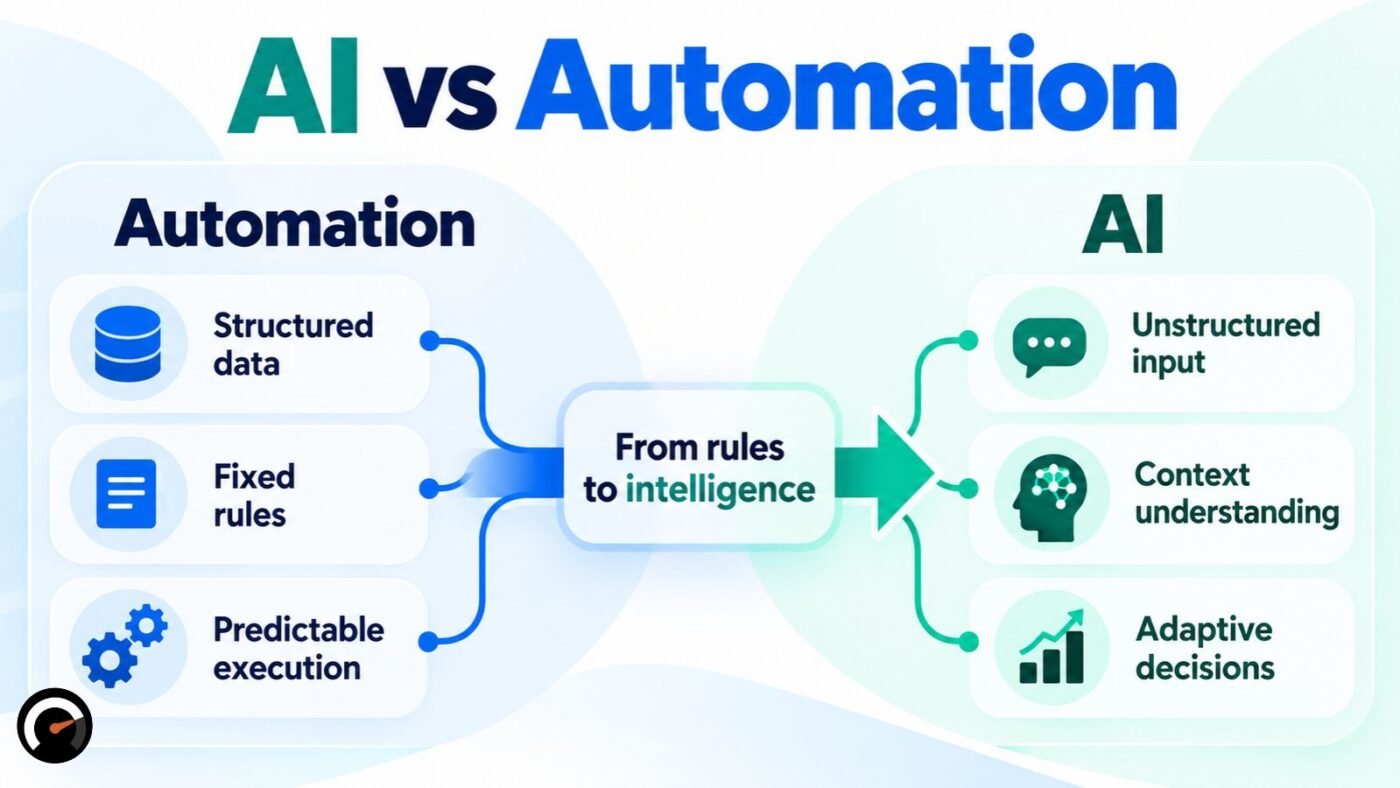
Automation follows rules you write in advance. AI handles the parts of a task where those rules run out: interpreting language, judging context, predicting an outcome.
Most real workflows need both. The useful question is which steps belong to each one, and where a human should stay in control.
This guide covers the technical difference, a method for splitting a workflow between the two, and the different ways each one fails.
What Is the Technical Difference Between AI and Automation?
Automation is deterministic: the same input produces the same output, through rules a person wrote. AI is nondeterministic: it produces output from statistical patterns, so results can vary even on similar input.
Red Hat uses exactly these terms. It calls automation deterministic and rule-based, and it calls AI nondeterministic and predictive. It also describes AI as the part that learns and adapts.
That last description needs a correction. It fits some systems, but most deployed AI does not learn while it runs. A model does not update itself during use. It changes when someone retrains it, fine-tunes it, or swaps it for a different version.
So the defining trait of AI is not ongoing learning. Nobody hand-wrote the decision logic for each case.
Automation’s rigidity is its value. It can’t improvise, which is why it suits payroll runs, backups, and compliance logs where deviation is the problem.
AI trades that predictability for flexibility. It becomes necessary when input is messy language, an image, or a judgment call no fixed rule covers.
The 3-Layer Test: AI, Automation, or Human?
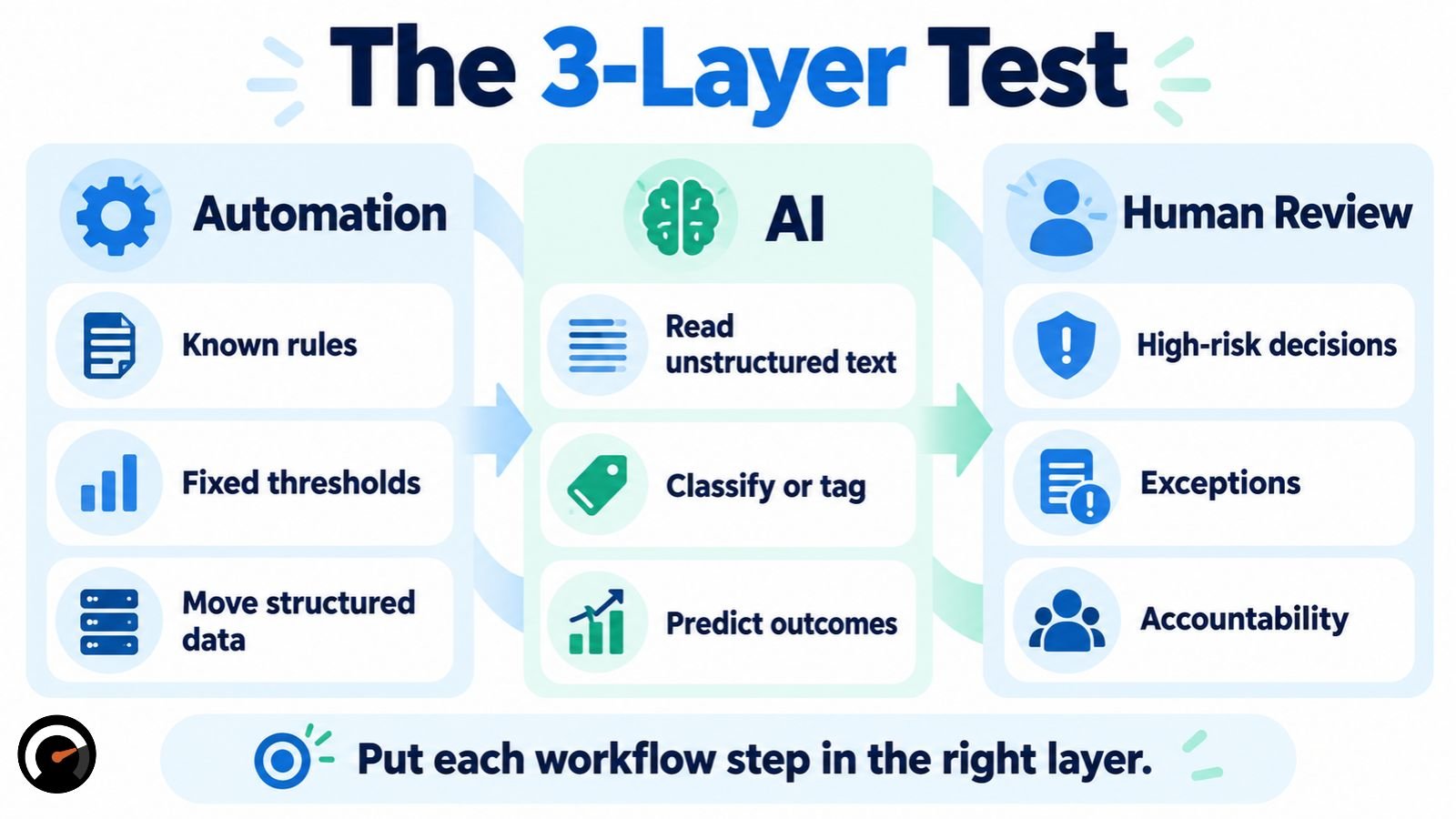
Don’t label a whole project “an AI project” or “an automation project.” Break it into steps and assign each step to one of three layers.
| Workflow step | Best fit | Why |
|---|---|---|
| Trigger an action | Automation | The rule is already known |
| Move data between systems | Automation | No interpretation needed |
| Read unstructured text | AI | Requires interpreting meaning |
| Classify or tag something | AI | Pattern recognition, not a fixed rule |
| Approve against a fixed threshold | Automation | Explicit rule (e.g., under $50 → approve) |
| Make a high-risk decision | AI + human | Needs accountability before acting |
| Handle an exception nobody scripted | AI or human | Depends on context |
| Execute an approved action | Automation | Mechanical, no judgment left |
A test for the boundary: look at what your if/else branches are trying to do. If they check a value, that’s automation. If they try to guess what a customer meant, you’re writing an interpretation step by hand, and a model will handle it better. Many nested branches around one step is a common symptom, but it’s a rule of thumb, not a standard.
Example: Routing a Refund Request
Here is the 3-layer test applied to a customer support ticket:
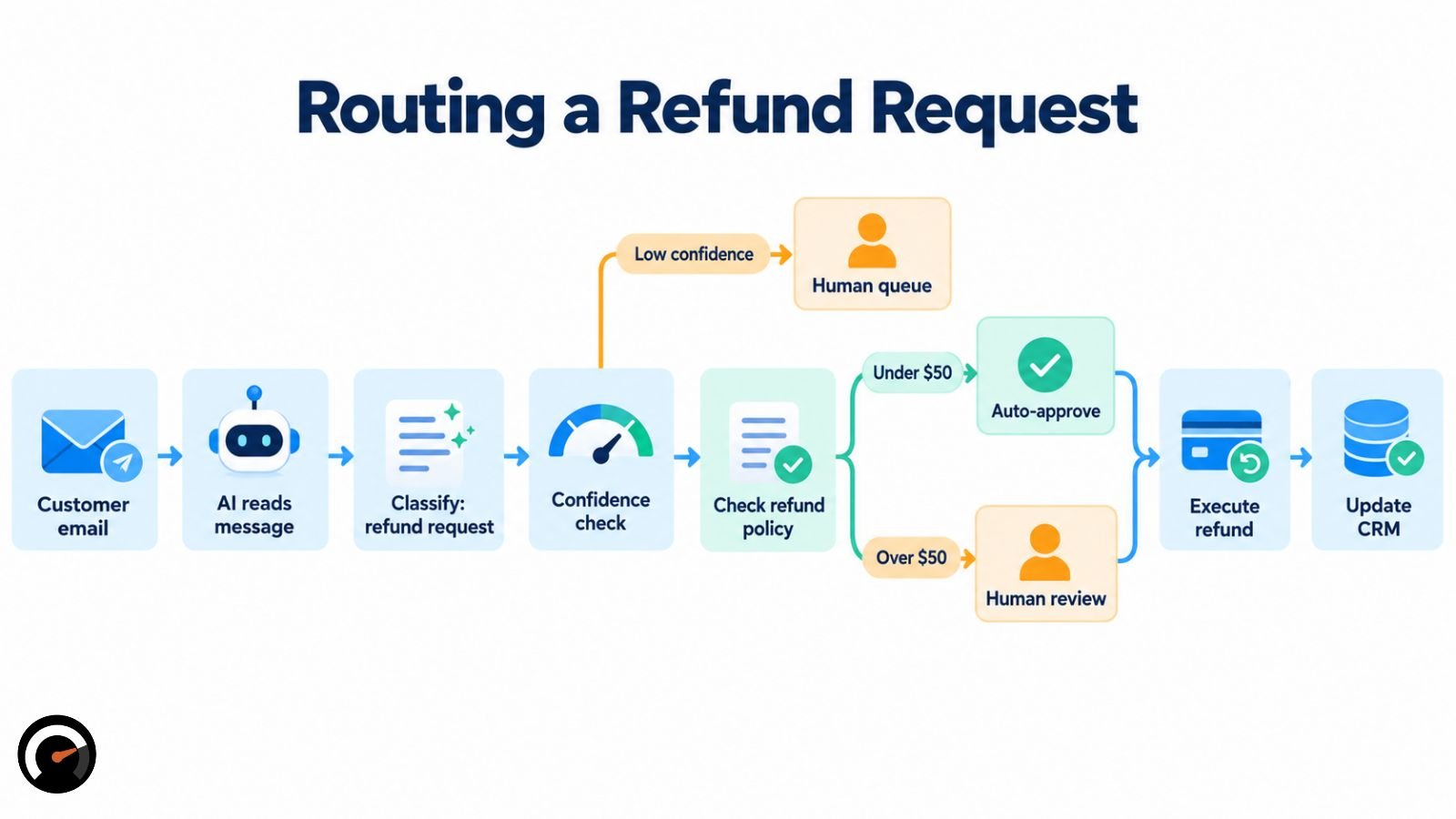
- Automation catches the incoming email and pulls the customer’s account data.
- AI reads the message, identifies intent, and classifies it as a refund request. It also returns a confidence score.
- Automation checks that score. If confidence falls below a set threshold, it sends the ticket to a human queue instead of acting.
- Automation routes confident classifications to billing and checks the refund amount against policy.
- Automation auto-approves refunds under $50. Anything larger goes to a human for review.
- Automation executes the approved refund and updates the CRM.
AI appears only where interpretation is needed. Everything mechanical stays in automation. Step 3 matters most: it stops a misclassification from turning into an action nobody reviewed.
Should You Use AI or Automation? A Decision Matrix
Run each step through this table instead of categorizing the whole project.
| If your step… | Start with |
|---|---|
| Repeats the same logic every time | Automation |
| Relies on fixed rules or thresholds | Automation |
| Moves structured data between systems | Automation |
| Requires parsing language, images, or audio | AI |
| Detects a pattern you can’t write as a rule | AI |
| Predicts an outcome | AI |
| Involves a high-risk or irreversible decision | AI + human review |
| Has neither clear rules nor reliable data | Fix the process first |
The last row is the one people skip. If a process is broken, or happens too rarely to justify the build cost, adding AI or automation fixes nothing. It automates a mess.
What Are Real Examples of AI vs Automation?
Zapier’s explainer gives two clean cases. Adding a form submission to an email list is pure automation. Labeling a task as high or low priority based on its context needs an AI step, because a fixed rule can’t read context.
Zapier’s second example combines both. An RSS feed triggers a workflow, an AI step assigns each article a category, and automation then writes the record to Airtable.
| Industry | Automation alone | AI layered on top |
|---|---|---|
| Customer service | Auto-reply confirming a ticket | Answering a specific, personalized question |
| IT operations | Scheduled server patching | Predicting which server is likely to fail |
| Finance and accounting | Routing an invoice by dollar amount | Flagging a duplicate or fraudulent invoice |
| Software testing | Running the same scripted test steps | Recognizing a UI element after the layout changed |
| Sales | Sending a scheduled follow-up email | Scoring which leads are likely to convert |
Is Automation Possible Without AI?
Yes. Most automation running today uses no AI. Scheduled backups, form-to-database pipelines, and notification systems ran on fixed rules long before machine learning was practical to deploy at scale.
AI now gets added to handle what rule-based systems always struggled with: unstructured text, images, and decisions that shift with context.
Is AI a Type of Automation?
Sources disagree. Some treat AI as a form of automation, since both reduce manual work. Zapier says the two are different technologies: AI can power a step in an automated workflow, but it isn’t automation itself.
For workflow design, the second framing is more useful. It keeps the question practical: which steps follow a fixed path, and which need interpretation.
AI vs Automation vs RPA vs AI Agents
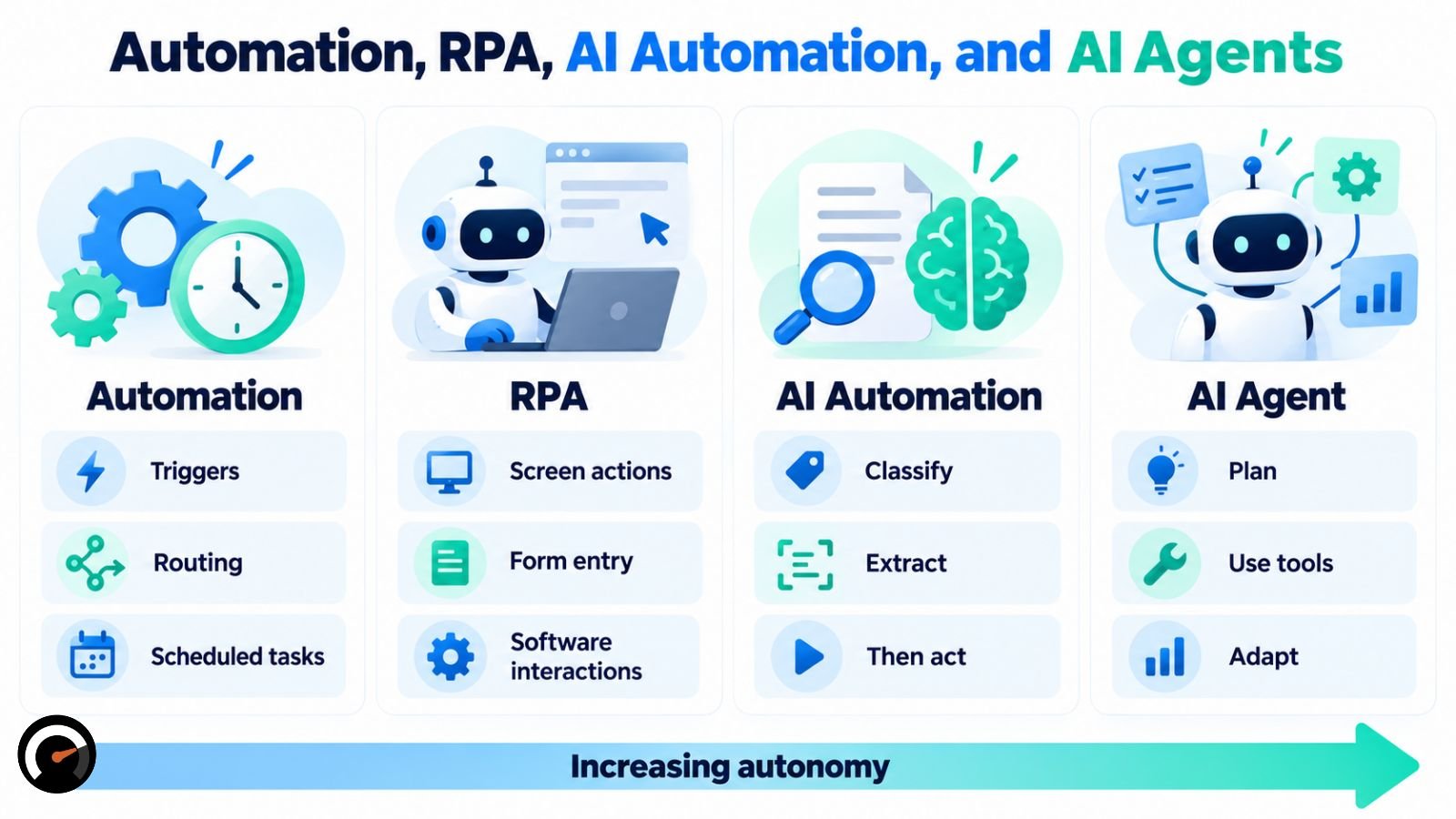
These terms overlap enough to cause real confusion. Here is the hierarchy:
- Automation executes predefined actions through fixed logic. Zapier and Make are common tools for this layer.
- RPA (robotic process automation) mimics human clicks, typing, and screen interactions across software interfaces. UiPath is a well-known example.
- AI interprets, classifies, predicts, or generates output using a model. In a workflow, this is often a single LLM step.
- AI automation combines AI’s interpretation with automation’s deterministic execution.
- Intelligent automation is the term Red Hat uses for combining consistent, repeatable automation with adaptable AI. In practice it overlaps heavily with AI automation.
- AI agent pursues a goal across multiple steps and chooses its own next action or tool at runtime.
The line between an AI-assisted workflow and an agent is who decides the next step. In an AI-assisted workflow, a person mapped the sequence in advance and AI handles one step inside it. In an agent, the model picks the next action itself, within set limits.
Much of what gets sold as an “AI agent” is the first case: an automation workflow with one AI step in it.
Where AI and Automation Fail Differently
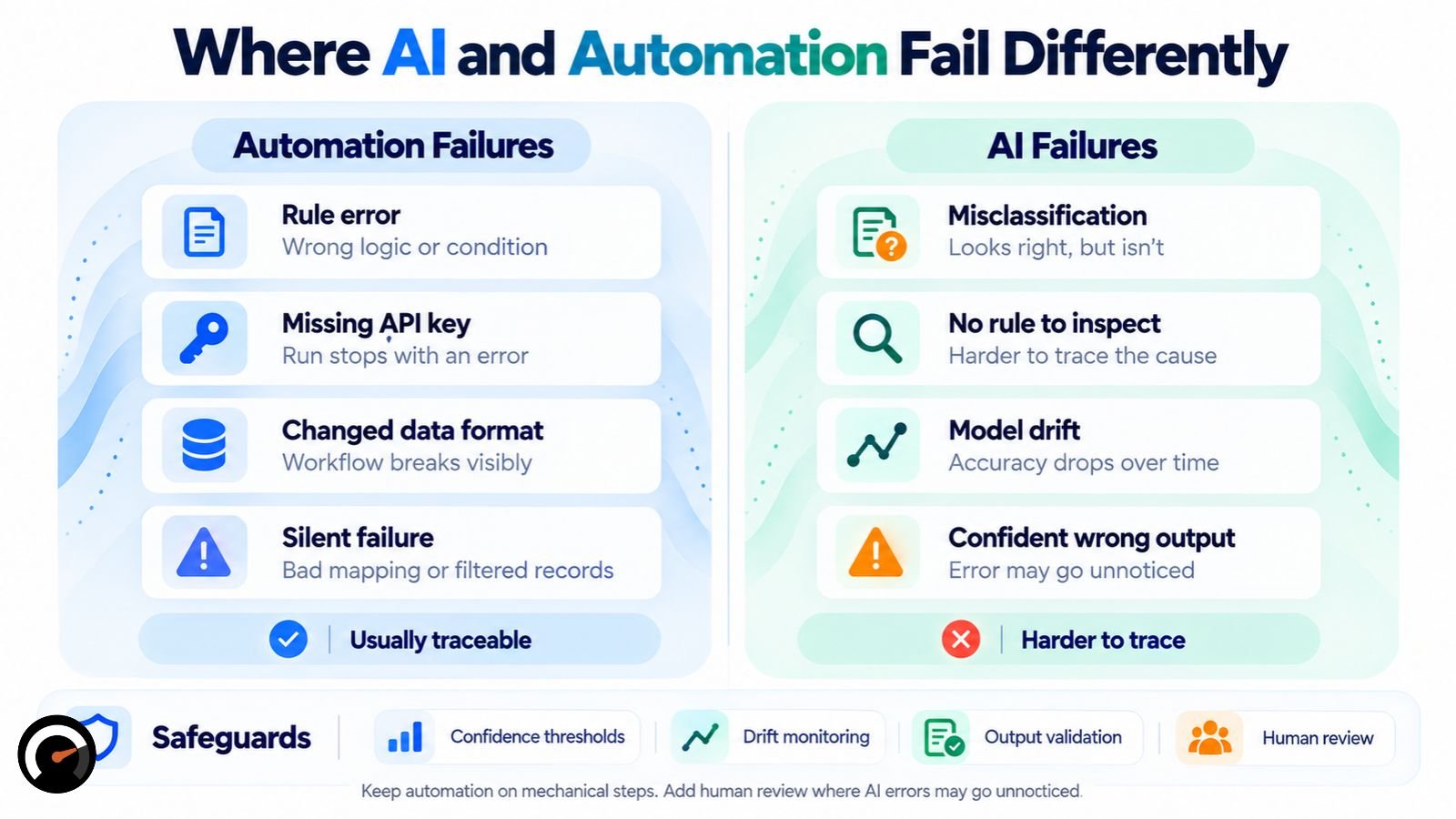
Automation failures are usually traceable. When something breaks, you can inspect the rule that caused it. A missing API key or a changed data format often stops the run and throws an error.
Automation can also fail silently. A filter can quietly exclude records, a mis-mapped field can write the wrong value to your CRM, and a partial run can still show as successful. The difference is that you can trace the cause afterward.
AI failures are harder to trace. A misclassification doesn’t throw an error. It produces an answer that looks correct and isn’t, and there is no rule to inspect. Accuracy can also drift as real-world input moves away from what the model was trained on.
Confidence thresholds, drift monitoring, and output validation catch many of these failures. Someone has to build them deliberately, though. They don’t come with the model.
That is the practical case for the 3-layer approach. Keep automation in charge of anything mechanical and irreversible. Put a human review step wherever an AI error could go unnoticed.
This is the kind of step-by-step breakdown AI Work Audit produces. A sample audit report shows what it looks like on a real task.
AI vs Automation: Cost, Risk, and Maintenance
| Dimension | Automation | AI |
|---|---|---|
| Execution cost | Usually predictable | Usually variable (inference/API-based) |
| Output consistency | Identical for identical input | Can vary on the same input |
| Monitoring needed | Error and rule monitoring | Quality monitoring plus error monitoring |
| What changes over time | The workflow logic | The model, the provider, or the underlying data |
| Explainability | Usually straightforward | Depends on the model and system design |
| Best-fit input | Structured | Unstructured or variable |
| Main risk | A brittle workflow that breaks on edge cases | An incorrect output that looks correct |
Neither column is cheaper or safer across the board. A small AI integration can cost less to set up than a rule-based workflow spanning several legacy systems.
Running every step through a model does cost more, though. Zapier reports that workflows reserving AI for the steps that need judgment cost up to 71% less to run than workflows routing everything through a model. That figure is vendor data from Zapier’s own platform, so treat it as directional evidence, not an industry benchmark.
Does AI Replace Automation?
No. They work at different layers of the same system. AI can replace or augment a specific decision step. Automation still handles the triggers, routing, data movement, and execution around it.
Will AI and Automation Affect Jobs?
Repetitive, rule-based tasks are the most exposed to automation, while work built on judgment and relationships has proven harder to automate. Estimates vary widely and mostly measure task exposure, not job elimination, so looking at work task by task tells you more than a headline percentage.
Frequently Asked Questions
Q. What is the core difference between AI and automation?
AI interprets, predicts, or generates output from data, while automation executes predefined rules and actions. Automation works best when the process is predictable and the rules can be written in advance; AI is useful when a workflow requires interpretation, pattern recognition, prediction, or generation.
Q. Is automation possible without AI?
Yes, automation can work entirely without AI. Scheduled backups, payroll workflows, transactional emails, database updates, and notifications can all run through fixed rules, triggers, and predefined actions without using an AI model.
Q. Does AI replace automation?
No, AI does not replace automation; the two often work together in the same workflow. AI can handle interpretation or decision-making, while automation manages triggers, data movement, routing, approvals, and execution.
Q. Is AI a type of automation?
AI and automation are related but are not the same technology. Automation follows predefined instructions to perform actions, while AI uses models to interpret information, recognize patterns, predict outcomes, or generate content. AI can be used as one step inside an automated workflow.
Q. What’s the difference between AI automation and RPA?
RPA uses predefined rules to automate repetitive interactions with software, while AI automation adds AI for tasks that require interpretation or judgment. RPA can move data between applications or mimic clicks and keystrokes; AI automation can first classify an email, extract information from a document, or interpret a request before triggering the automated action.
Q. What’s the difference between an AI agent and AI automation?
AI automation follows a workflow designed in advance, while an AI agent can choose its next action or tool at runtime to achieve a defined goal. An AI-powered workflow might use a model for one classification step, whereas an agent can determine which tools, steps, or actions to use within predefined permissions and limits.
Q. Can automation use AI?
Yes, automation can use AI as one step in a larger workflow. For example, automation can receive a customer email, AI can classify the request, and automation can then route the ticket, update the CRM, or trigger an approved action.
Q. When should you use neither AI nor automation?
Use neither when the underlying process is poorly defined, rarely performed, or not worth the cost and risk of automating. Fix the process first when the rules, inputs, ownership, or desired outcome are unclear; otherwise, automation or AI can make an inefficient process run faster without solving the underlying problem.
Not Sure Which Parts of Your Workflow Need AI?
Don’t automate a workflow just because AI can handle it. AI Work Audit breaks a task into its individual steps and identifies where AI, automation, or human review makes sense.
Run an AI Work Audit to see where your workflow can be improved, what should stay under human control, and where automation may be unnecessary.
| Disclaimer: This article is for informational purposes only. AI and automation capabilities, pricing, performance, and implementation requirements vary by tool, workflow, and provider and can change over time. Examples and comparisons are intended to explain workflow concepts, not to guarantee specific results or recommend a particular technology. Always verify current documentation, costs, security requirements, and applicable policies before deploying AI or automation in a business process. |
Test this on a real task
The audit is free and takes about ninety seconds. It returns a verdict, a readiness score and the supervision the task would need.
Run the audit