
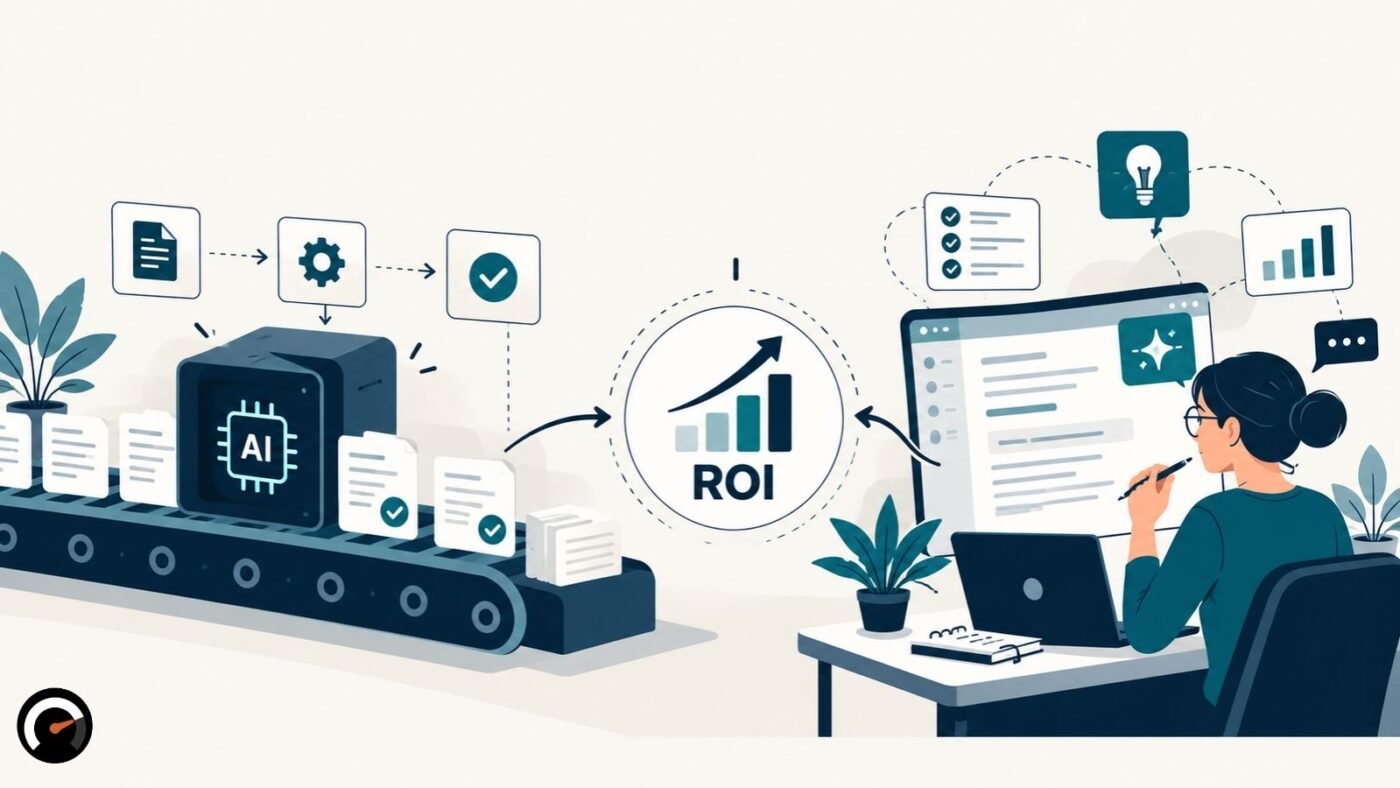
Every task you hand to AI ends up in one of three places. Software does the task, AI helps a person do it, or a person keeps doing it alone. Each option comes with its own costs, risks, and review work, and the right one can change from one step to the next inside a single workflow.
Most advice on this topic picks a side. This piece doesn’t. It walks through what the research shows and where it runs out. Then it gives you a way to sort your own tasks, a cost model that charges every option for its mistakes, and clear signals for when to expand a pilot or kill it.
What is the difference between AI augmentation and AI automation?
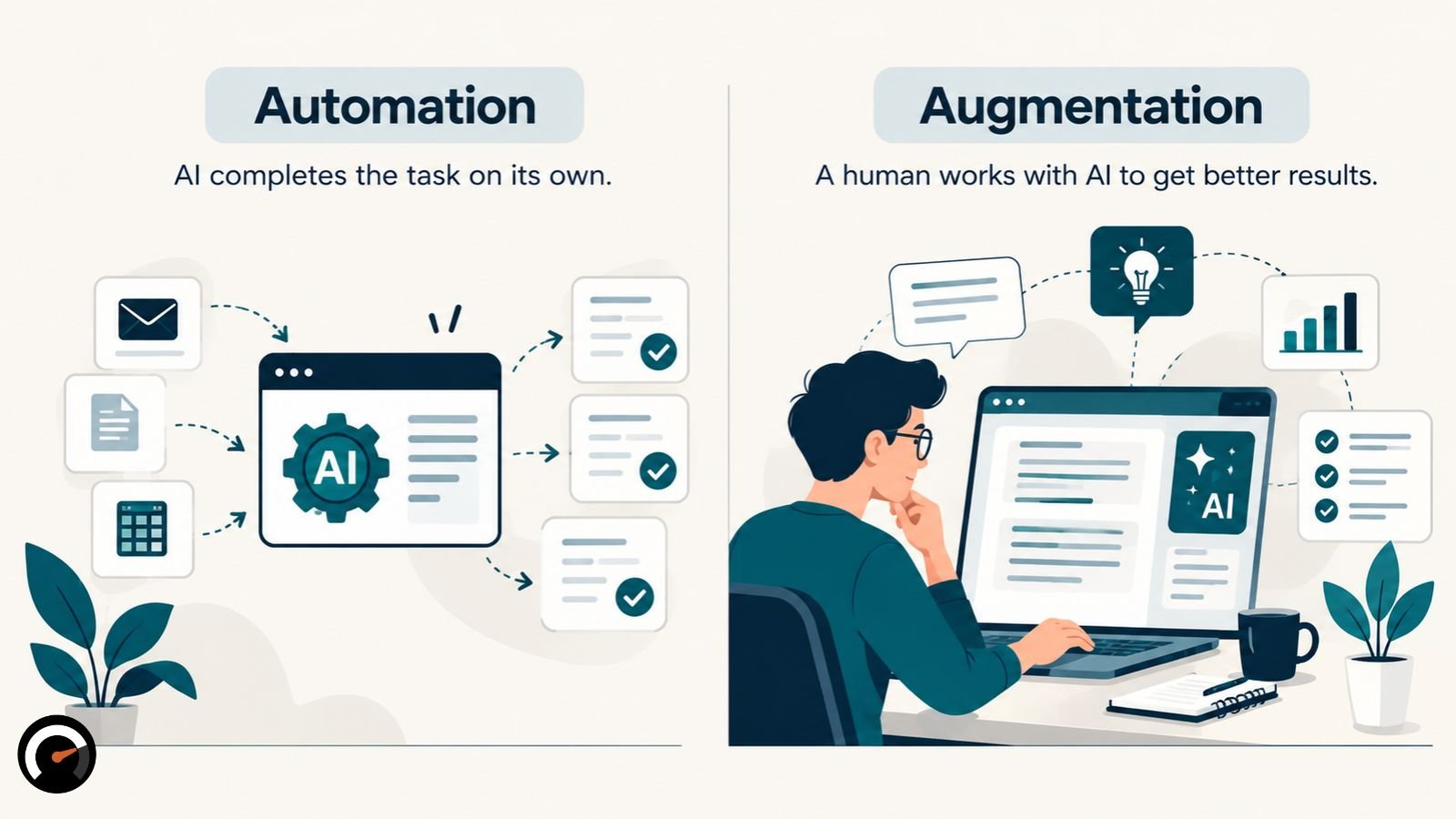
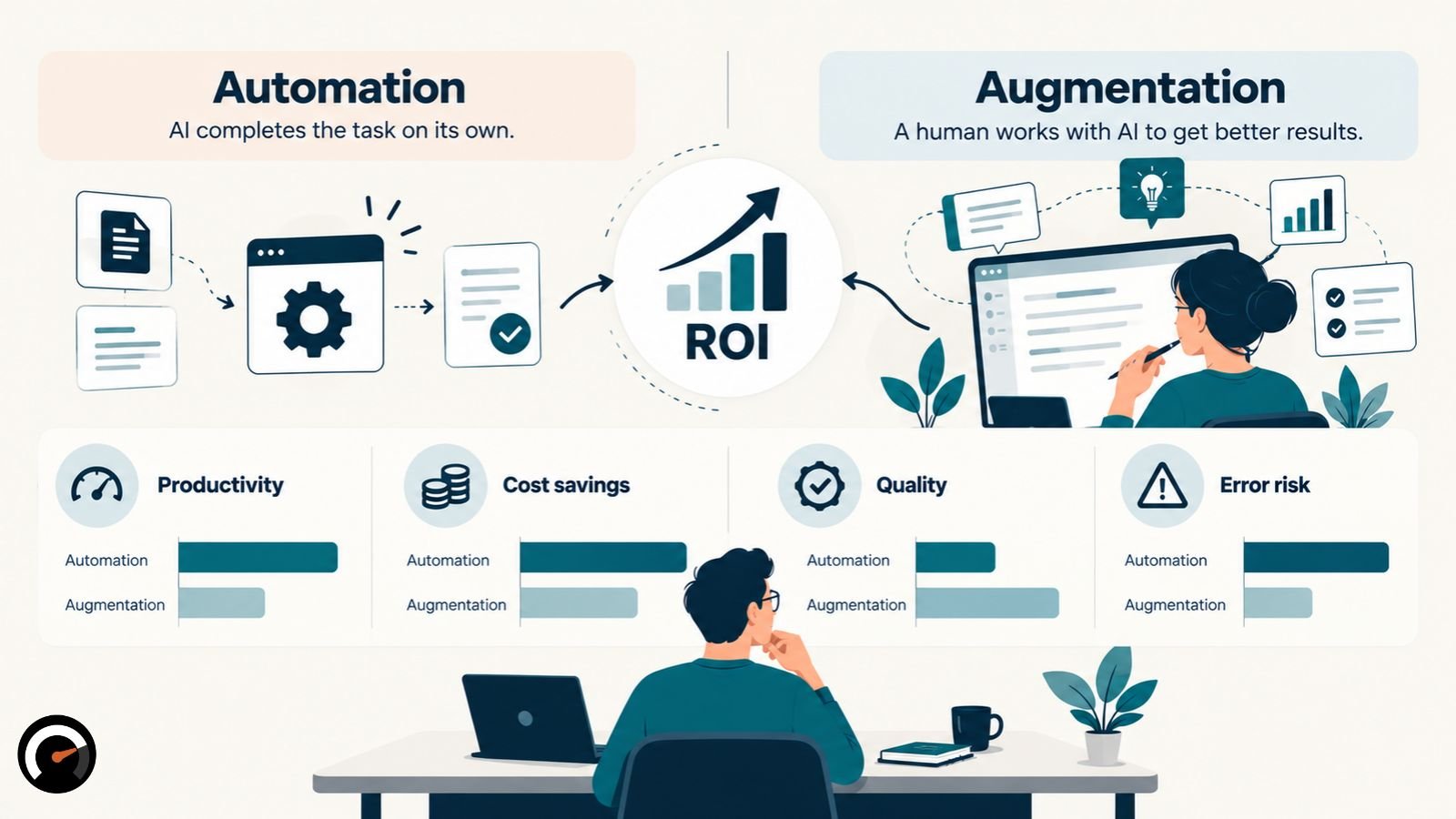
AI automation means software finishes a task with little or no human involvement. AI augmentation means AI extends what a person can do, while that person still directs, checks, or uses the result.
The difference is about the person’s role, not the technology. One model can automate a task on Monday and augment a different task on Tuesday.
Automation is also much older than AI. Rule-based scripts have run backups and moved files for decades. That’s a different comparison, covered in how AI differs from rule-based automation.
One trap is worth naming early. A reviewer who signs off on output doesn’t automatically make a workflow augmented. If that reviewer lacks the time, the skill, or the authority to reject a bad result, the work is really automated. The signature is decoration.
Human-in-the-loop, on-the-loop, and out-of-the-loop
These three terms describe where the person sits relative to the AI’s output:
- Human-in-the-loop: a person approves or fixes the output before it takes effect.
- Human-on-the-loop: the system acts by itself, and a person watches and can step in.
- Human-out-of-the-loop: the system acts with no routine review at all.
The first design usually counts as augmentation. The other two are both automation. What separates them is how quickly someone can step in when the system goes wrong.
How does the Human Agency Scale measure augmentation and automation?
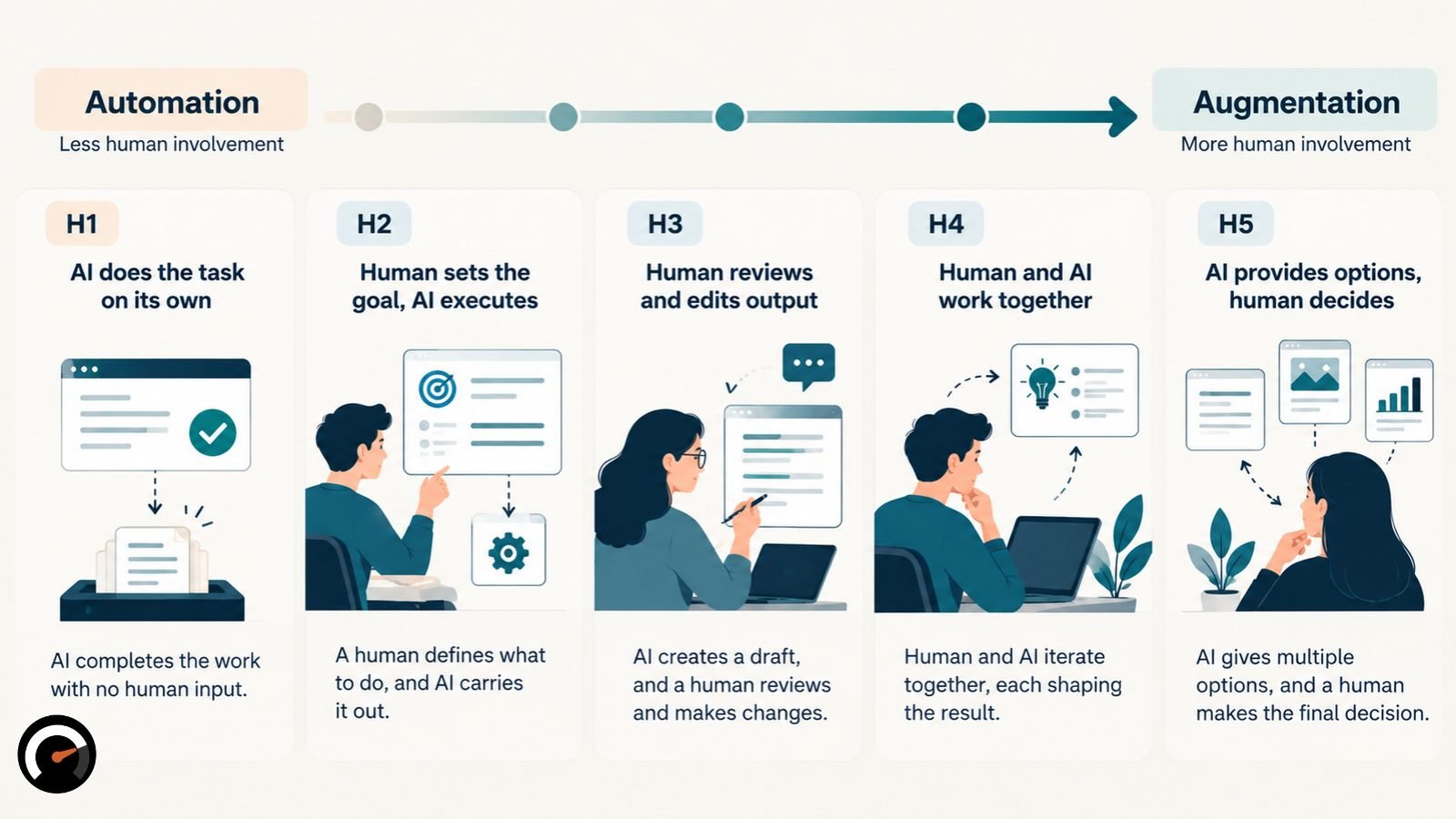
Stanford researchers built the Human Agency Scale to rate how much human involvement a task needs. It has five levels:
| Level | What it means |
|---|---|
| H1 | The AI agent handles the task entirely on its own |
| H2 | The AI agent needs minimal human input |
| H3 | Human and AI form an equal partnership that beats either alone |
| H4 | The AI agent needs human input to finish the task |
| H5 | The AI agent can’t function without continuous human involvement |
The authors file H1 and H2 under automation and H3 through H5 under augmentation. They also warn against reading the scale as a ladder. A higher number isn’t better, because different tasks call for different levels.
The researchers designed the scale to complement the SAE’s L0–L5 levels for self-driving cars. The SAE levels describe how much the machine does. Stanford’s scale describes how much the person is still needed.
Which tasks do workers want AI to automate?
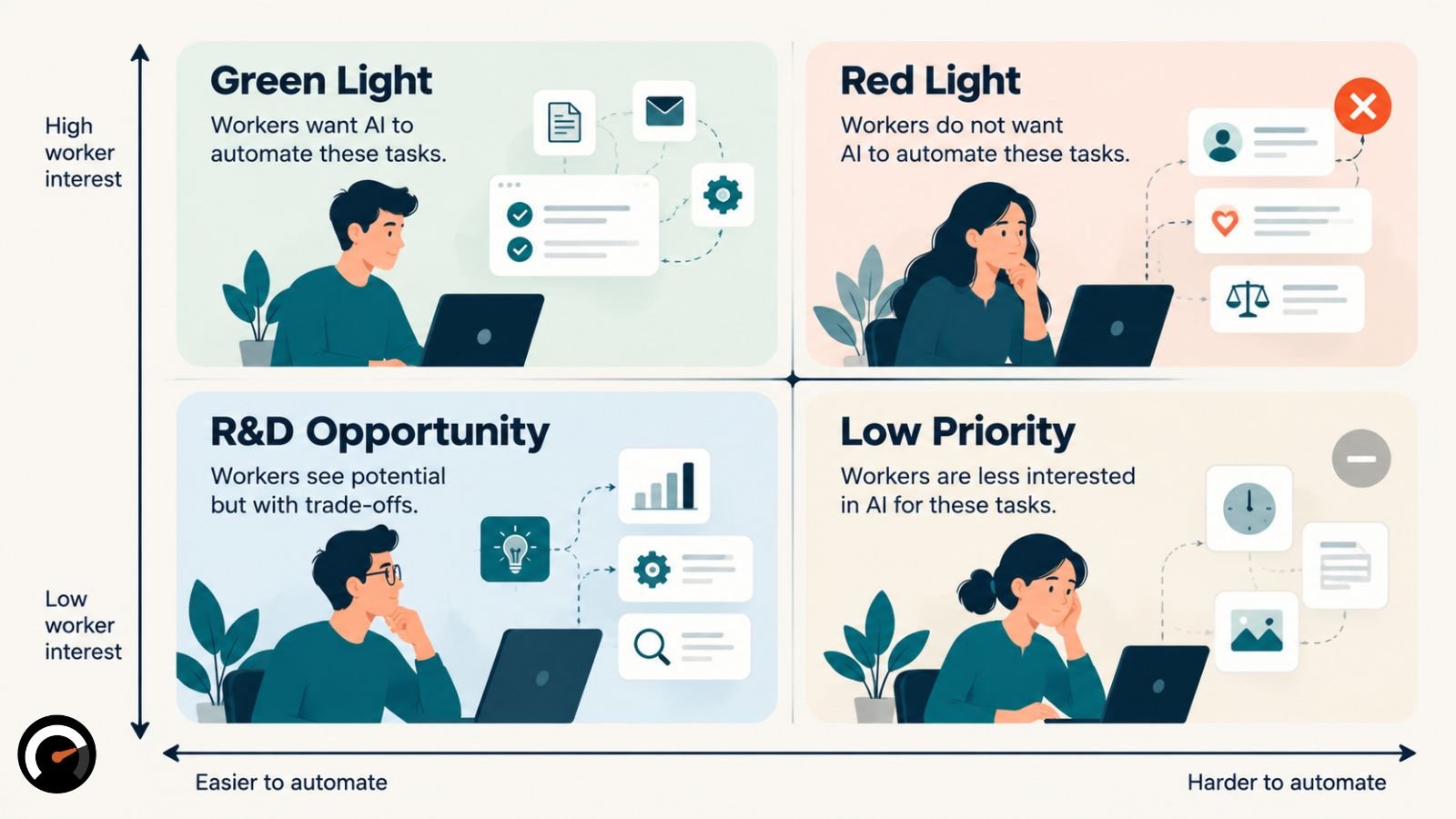
Workers want AI to take the repetitive, low-value work. On judgment-heavy work, they want a partner instead. Stanford found that workers viewed automation positively for 46.1% of tasks. Equal partnership (H3) was the most-wanted level in 47 of 104 occupations, or 45.2%.
The study surveyed 1,500 workers and 52 AI experts about 844 tasks across those 104 occupations. Data collection ran from January to May 2025, with participants recruited through Prolific, Upwork, and LinkedIn.
The most common reason workers gave for wanting automation was to free up time for higher-value work. It appeared in about 69% of pro-automation responses.
Workers and experts rarely matched. They agreed on the right level of involvement for only 26.9% of tasks. On 47.5% of tasks, workers wanted more say than the experts thought was technically necessary.
Stanford then crossed what workers want with what AI can currently do. The result was four zones:
| Zone | Worker desire | AI capability | What to expect |
|---|---|---|---|
| Green Light | High | High | The safest automation candidates |
| Red Light | Low | High | Likely pushback from workers |
| R&D Opportunity | High | Low | Wanted, but AI isn’t there yet |
| Low Priority | Low | Low | Little reason to act |
One detail from the study is worth remembering before you buy any automation tool. When the researchers mapped Y Combinator startups onto these tasks, 41.0% of the matches landed in the Low Priority or Red Light zones. Ask a vendor which zone your task falls into, and watch how they answer.
Keep the limits in mind. These figures measure preferences, not performance. The authors also describe their data as a snapshot of AI in early 2025.
How are people actually using AI at work?
On Claude.ai, conversations split roughly evenly between the two modes, with augmentation slightly ahead. Developer traffic through Anthropic’s API leans hard toward automation. Treat both as one company’s traffic data, not a measure of how much work businesses have automated.
The Anthropic Economic Index sorts conversations into five modes. Directive use and feedback loops count as automation. Learning, task iteration, and validation count as augmentation.
| Data sample | Claude.ai conversations | API traffic |
|---|---|---|
| January 2025 | 56% augmented, 41% automated | Not tracked |
| August 2025 | Automation briefly ahead, 49% to 47% | Automation-dominant |
| November 2025 | 52% augmented, 45% automated | About three-quarters automated |
| February 2026 | Augmentation up slightly | Automation down sharply |
The November 2025 figures come from the January 2026 Economic Index report, which sampled one million Claude.ai conversations and one million API records. The February numbers come from the March 2026 report.
Directive use is the purest form of handoff: the user gives an instruction and takes the result. Its share of Claude.ai conversations climbed from 27% in January 2025 to 39% in August, then slipped to 32% by November.
The measurement is shifting too. Anthropic’s June 2026 report says more sessions now run as long agentic tasks in Claude Code and Cowork. Chat transcripts alone no longer tell the full story, so expect later splits to be measured differently.
Anthropic draws one more distinction that’s easy to miss. Automation describes how little back-and-forth a task involves. Autonomy describes how much the model gets to decide. Translating a paragraph into French scores high on automation but low on autonomy, because the model has almost nothing to decide.
Use these numbers for direction, not precision. Each API record is a single prompt and its response, so the data can’t show multi-step workflows or how a team reviews results.
Does augmentation or automation deliver better ROI?
Nobody has settled this question. No study has pitted the two strategies against each other on return on investment. What exists is narrower evidence, and it leans toward augmentation on tasks AI handles well. Automation still tends to cut costs fastest on stable, high-volume work.
Four pieces of evidence matter most:
- Customer support. Brynjolfsson, Li, and Raymond tracked 5,179 support agents using an AI assistant. On average, agents resolved 14% more issues per hour. Novice and low-skilled agents improved by 34%, while veterans barely moved.
- Consulting. Dell’Acqua and colleagues ran a field experiment with 758 BCG consultants. On tasks AI handles well, consultants using it finished 12.2% more tasks, worked 25.1% faster, and produced work rated more than 40% higher in quality. On a task outside AI’s strengths, consultants using AI were 19 percentage points less likely to get the right answer.
- The long-run argument. In an April 2026 Harvard Business Review piece, Jan-Emmanuel De Neve, Jeffrey Hancock, and Kate Niederhoffer argue that automation can pay off sooner, but augmentation is likely to win over time through engagement and talent retention. They frame this as a likely outcome. They didn’t measure it.
- Reliability. Anthropic’s January 2026 modeling projected that AI could add 1.8 percentage points a year to labor productivity growth. Once time savings were discounted by how often tasks actually succeeded, the figure dropped to 1.2 points for Claude.ai usage and 1.0 for API traffic.
The BCG result is the one to remember. The same tool helped on one task and hurt on another that looked equally hard. The researchers call this uneven pattern the “jagged technological frontier,” and it’s the main reason to make this decision one task at a time.
How do you decide whether to automate or augment a task?
Score each task on seven factors, then confirm the result with a pilot. This framework is editorial. It builds on Stanford’s task-level approach but hasn’t been validated as a model.
| Factor | Points to automation | Points to augmentation | Points to human-led |
|---|---|---|---|
| Input variability | Standard, structured | Semi-structured | Ambiguous or unusual |
| Error severity | Low impact | Moderate, reviewable | Legal, safety, or trust harm |
| Reversibility | Easy to undo | Undoable with effort | Hard or impossible to undo |
| Verification | Rules catch errors | An expert checks in minutes | Needs a deep audit |
| Permissions | Drafts or recommends | Recommends; a person acts | A person decides and acts |
| Volume | Enough to repay setup | Moderate | Too low to justify setup |
| Judgment | Measurable criteria | Context matters | Discretion and accountability |
Then work through five questions, in order:
- Can you define the task and check its output?
- What happens when the system gets it wrong?
- Can you catch and reverse an error before it does damage?
- Can the system only recommend, or can it act?
- Do the gains survive review, exceptions, and running costs?
If the answer to any of the first four is no, the task belongs with augmentation or a person. If only the fifth fails, the problem is economic. The risk may be acceptable, but the numbers don’t work.
AI augmentation vs automation examples by business function
The starting points below are editorial. Treat each one as a guess to test against your own error costs.
| Function | Automate | Augment | Keep human-led |
|---|---|---|---|
| Customer support | Ticket tagging and routing | Complaint replies | Out-of-policy refunds |
| Finance and accounting | Data entry and invoice matching | Internal report drafts | Tax or filing advice to clients |
| HR and recruiting | Routing onboarding paperwork | Job descriptions and screening summaries | Hiring decisions and legally required checks |
| Marketing | Publishing approved copy on schedule | Campaign angles and first drafts | Brand positioning |
| Sales operations | CRM updates and meeting logs | Account research briefs | Pricing exceptions |
Repetitive doesn’t always mean automatable. AI Work Audit’s sample oversight report covers a fictional accounting firm, and it scores client queries at 17 out of 100. The report recommends against automating them. Reviewers would have to read 38% of AI-drafted replies indefinitely, which makes the hybrid setup more expensive than doing the work by hand.
The report’s fix is to split the workflow. Routine document-chasing gets pulled out of “client queries” and becomes a reasonable candidate for automation. The advice stays with a person.
Can one workflow mix automation, augmentation, and human-led steps?
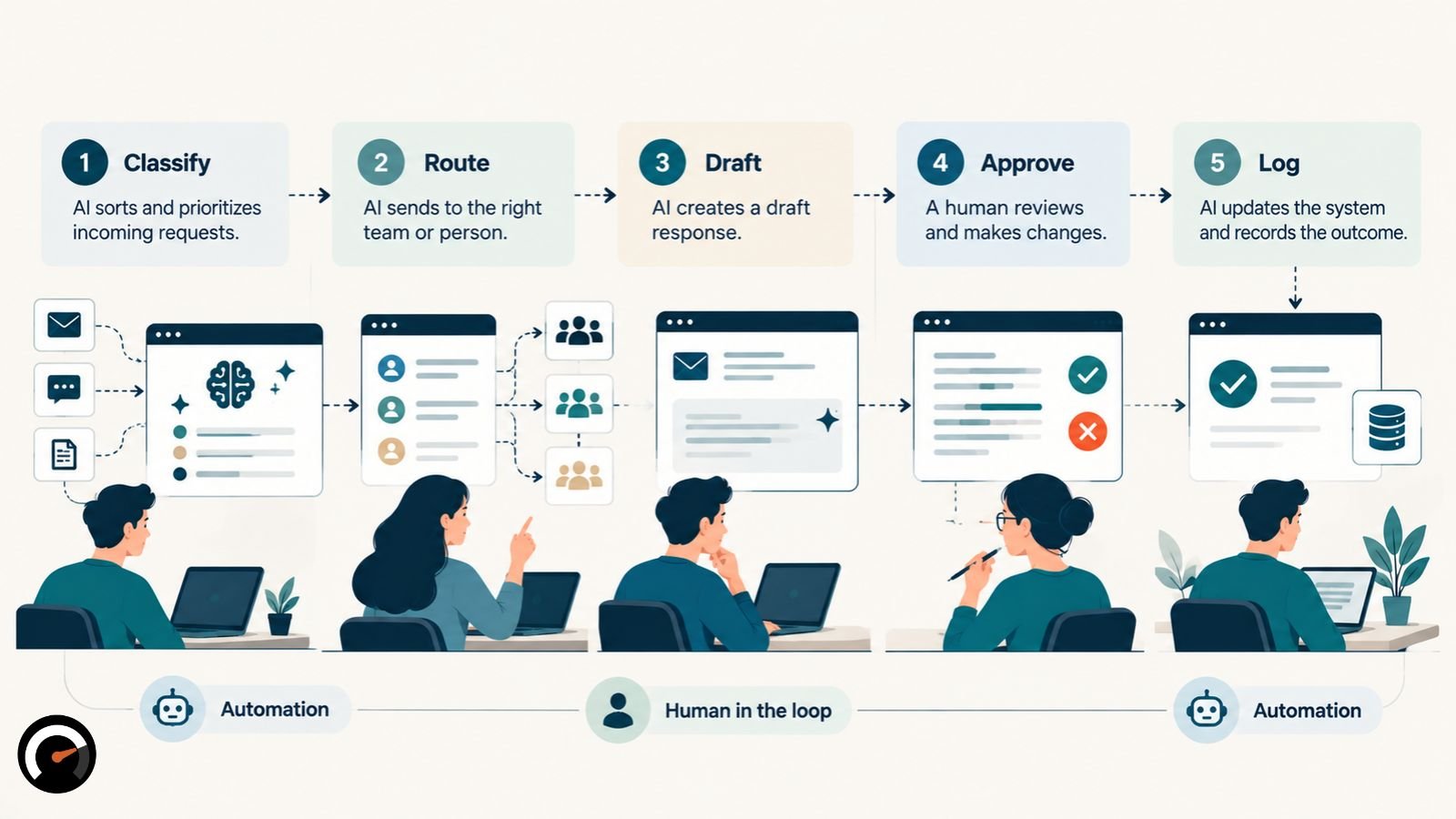
It can, and most workflows should. Predictable steps get automated, judgment steps get help, and decisions with real consequences stay with someone who has the authority to make them. The support example below is hypothetical.
| Support workflow step | Starting approach | Reason |
|---|---|---|
| Classify incoming tickets | Automation | Output can be checked against known categories |
| Route routine requests | Automation | Approved rules, with exceptions sent to review |
| Draft a complaint reply | Augmentation | Needs context and tone |
| Approve an out-of-policy refund | Human-led | Needs an authorized decision |
| Log the outcome | Automation | Records a finished decision |
A routine request can still need a person when the data is unreliable or the action has consequences.
How do you compare the cost of automation and augmentation fairly?
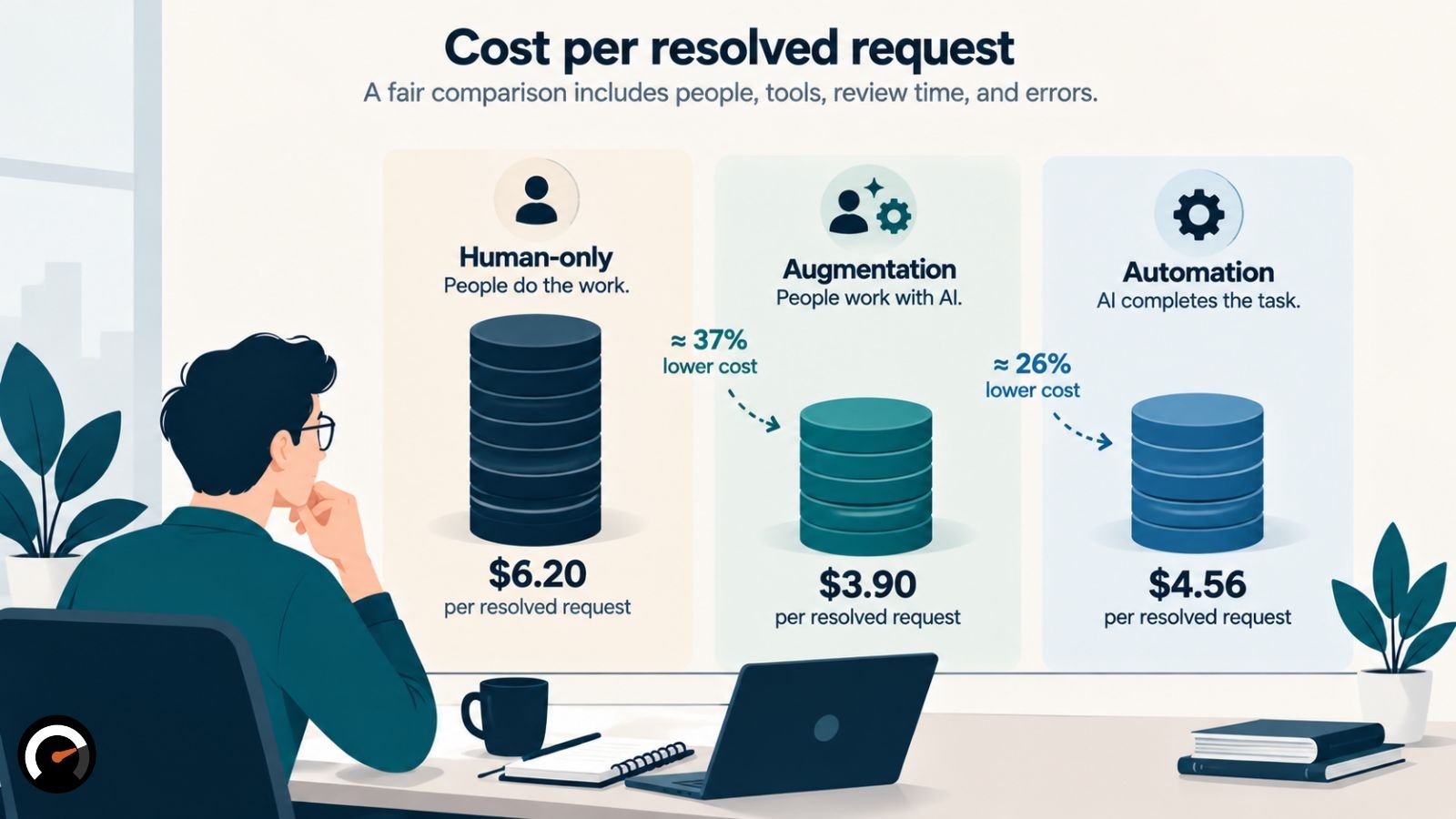
Measure cost per resolved task, not hours saved. Count review time, corrections, exceptions, setup, and monitoring. Then charge every option for its errors, including the errors people make.
This last point gets skipped most often. Many comparisons price AI mistakes and quietly assume people make none.
The example below is hypothetical:
- 1,000 support requests a month, with labor at $30 an hour
- Fixing an error costs $40, whoever made it
- Human-only: 10 minutes per request, with a 3% error rate
- Augmented: about 5 minutes per request with AI drafting, with a 2% error rate
- Automated: AI handles 700 requests alone with a 5% error rate, and people handle the other 300 as exceptions with a 3% error rate
| Human-only | Augmented | Automated | |
|---|---|---|---|
| Labor | $5,000 | $2,400 | $1,500 |
| AI usage | — | $100 | $100 |
| Setup and monitoring | — | $600 | $1,200 |
| Errors | 30 | 20 | 44 |
| Error recovery at $40 each | $1,200 | $800 | $1,760 |
| Total | $6,200 | $3,900 | $4,560 |
| Cost per resolved request | $6.20 | $3.90 | $4.56 |
Augmentation comes out cheapest here. Now drop the cost of fixing an error to $5. Automation falls to $3.02 per request and edges past augmentation at $3.20.
In this example, the two options break even at $12.50 per error. Below that, automation wins. Above it, augmentation does. What tips the balance is the price of a mistake, not the AI bill.
Saved hours aren’t saved money either. If the person stays on payroll and picks up other work, you’ve gained capacity. Your costs haven’t fallen.
To run the same comparison on your own figures, AI Work Audit publishes its scoring formulas in full. The formulas hold output constant and price review time as its own line item.
How do AI agents change the automation decision?
Once AI starts acting across several tools and steps, the labels matter less. What matters is what the agent is allowed to do, and where it has to stop and ask. Stanford defines an AI agent as a system that performs tasks autonomously by designing its own workflow and using software tools.
It helps to think in three tiers. The split is editorial:
- Assistant: drafts, summarizes, or recommends, and a person takes every action.
- Agent with gates: prepares and routes a case, then waits for approval at set triggers, such as a spending limit.
- Agent with authority: acts without pausing.
Grant authority only to steps that scored low on severity and easy on reversibility. Log every action, and restrict the data and systems the agent can touch.
Plenty of products sold as agents are fixed workflows with one AI step bolted on. The quickest test is who chooses the next step, which is the dividing line between workflows and true AI agents.
How do you keep human review from becoming a rubber stamp?
Every checkpoint needs four things: an owner, a clear list of what to check, protected time to do it, and the authority to stop the line. Review usually breaks down for a mundane reason. Nobody set aside the hours.
The underlying risk is automation bias, the habit of trusting machine output even when it’s wrong. The EU AI Act addresses it by name. Article 14 requires that people overseeing high-risk AI systems be able to stay aware of automation bias. The Act’s recitals add that those people need the competence, training, and authority to do the job.
Match each failure to a specific control:
| Failure mode | Control |
|---|---|
| Reviewers approve without checking | Protect review time and re-check a random sample of approved items |
| Errors repeat at scale | Error thresholds that pause the pipeline, plus a rollback plan |
| Exceptions pile up | A named owner for the exception queue and a target for clearing it |
| Review cost outgrows the savings | Track review minutes per task every week |
| An agent takes an unauthorized action | Permission limits, action logs, and approval gates |
Watch the override rate as well. Lots of overrides in one category means the system struggles there. Months without a single override means reviewers have probably stopped looking.
The idea that augmentation gradually slides into unmonitored automation is an interpretation, not a published finding. The controls above are how you keep it from happening.
When should augmentation graduate to automation?
Cut back human review only after the numbers earn it. A calendar date isn’t a reason. A task is ready to move toward automation when all four of these hold:
- Errors stay under your ceiling for a full review period.
- The exception queue clears on schedule.
- Reviewers still override some outputs, which shows they’re actually checking.
- Your samples include deliberate edge cases, not only random picks.
In AI Work Audit’s sample report, a data-entry workflow reduces review in stages. It starts at 40% of output, drops to 20%, and settles at 8%, and each step requires an error rate under 3% for the full period. The report also recommends sampling unusual cases on purpose, because a purely random sample is mostly routine work and reveals little about the edge cases.
Some tasks never graduate. When the barrier is accountability rather than AI capability, a better model won’t change the answer. Tax advice and legally required checks fall into this group.
When should you stop an automation pilot?
Stop, roll back, or redesign the pilot if errors cross your threshold, exceptions arrive faster than people can clear them, or review costs eat the savings. An unauthorized action is also grounds to stop. So is a result that lands below your baseline. Write all of these conditions down before launch, while you can still think about them calmly.
Start by recording a baseline: time per task, cost per resolved task, error rate, and customer outcome. Run the new process alongside the old one on a small batch of real work, usually for a few weeks. Expand only when the results clear your thresholds.
Does AI automation affect jobs differently than augmentation?
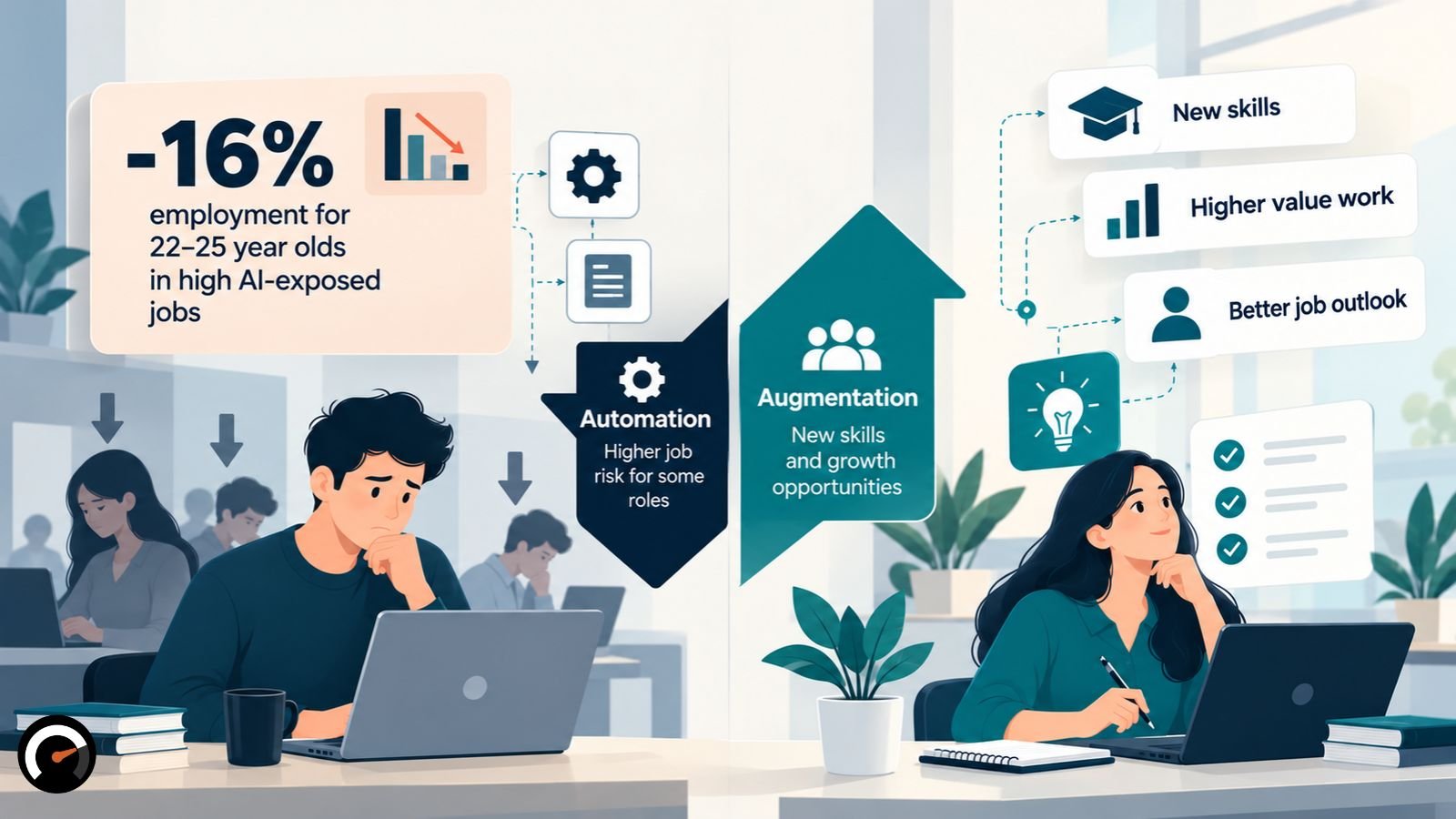
The early evidence says yes. Stanford’s “Canaries in the Coal Mine” study analyzed ADP payroll data. Workers aged 22 to 25 in the most AI-exposed occupations saw employment fall 16% relative to comparison groups, even after controlling for firm-level shocks. Experienced workers in the same fields held steady. The declines clustered in occupations where AI mostly automates work rather than augmenting it.
The data is early, US-only, and correlational. Still, it shows that the stakes of this choice go beyond the budget.
Skills shift too. Anthropic’s January 2026 report found that stripping out the tasks Claude already handles would deskill some jobs, such as travel agents, and upskill others, such as property managers.
There’s also a training problem. In the support study, the AI assistant helped beginners most. If you automate the tasks junior staff learn on, you need a different way for them to build skill.
Sentiment cuts both ways. In Stanford’s survey, 28.0% of workers voiced fear or negative feelings about AI at work, and distrust of AI’s accuracy was the top concern. Anthropic’s June 2026 survey of Claude users found the reverse among heavy delegators: the people who automated most felt best about their future pay and job security. That survey relies on self-reports, doesn’t represent the wider workforce, and can’t rule out that optimistic people simply delegate more.
What should a small business automate first?
Choose one task that’s frequent, low-stakes, and easy to check. Record how it performs today. Then run the AI version alongside the current process for a few weeks, with pass and fail thresholds set in advance.
Anything tied to client trust should stay with a person for now. To check a first candidate before committing, try the free 90-second task audit.
Automate, augment, or keep it human: the decision rule
Automate when errors are cheap, reversible, and easy to spot. Augment when a person’s judgment makes the result better. Keep the task with a person when nobody can afford or verify a mistake.
Make this call one task at a time, not as a company-wide policy. The same AI tool can lift quality on one job and quietly lower accuracy on the next. The research on long-run returns is still young, so expect these answers to shift as it matures.
Common questions about AI augmentation and automation
Q. What’s an example of augmentation versus automation in marketing?
Augmentation: a strategist asks AI for campaign angles, keeps the best two, and rewrites them. Automation: a script publishes already-approved ad copy on a fixed schedule.
Q. Is AI augmentation better than automation?
Not across the board. Field studies show augmentation lifting output on tasks AI handles well, and the HBR authors expect it to pay off more over time. For any single task, error cost, reversibility, and review effort decide the answer.
Q. What is human-in-the-loop AI?
Human-in-the-loop AI is a setup where a person reviews, approves, or corrects AI output before it takes effect. It only works if that person has the time, expertise, and authority to change the result.
Q. What is the Human Agency Scale?
The Human Agency Scale is Stanford’s five-level measure of how much human involvement a task needs. It runs from H1, where AI works alone, to H5, where the task needs continuous human involvement. H3 means an equal partnership.
Q. What is automation bias?
Automation bias is the tendency to accept machine output without enough scrutiny, even when it’s wrong. The EU AI Act treats it as a risk that oversight of high-risk AI systems has to address.
Q. Does AI automation replace jobs?
Early payroll data links automation-heavy AI use to fewer entry-level jobs in exposed occupations, while augmentation-heavy use shows little effect. Most jobs mix tasks that suit different approaches, so automating one workflow rarely removes a whole role.
Q. How do you measure the ROI of AI automation?
Compare cost per resolved task before and after launch. Include review, corrections, exceptions, setup, monitoring, and the cost of errors under every option. Count saved hours as savings only when spending actually goes down.
For more visit: AIWorkAudit
| Disclaimer: This article is for informational and educational purposes only and does not constitute financial, legal, employment, or professional business advice. Research findings, productivity figures, and employment statistics reflect specific studies and may not apply to every organization or industry. ROI calculations and cost comparisons are illustrative, not guaranteed outcomes. Businesses should independently evaluate AI capabilities, implementation costs, human oversight requirements, and potential risks before making automation or augmentation decisions. |
Test this on a real task
The audit is free and takes about ninety seconds. It returns a verdict, a readiness score and the supervision the task would need.
Run the audit