

An enterprise knowledge base for AI agents is the set of documents, chunks, metadata, and search indexes an agent pulls from before it answers or acts. This enterprise knowledge base building methodology runs eight steps: scope the agent’s decisions, rank your sources, parse and clean them, chunk by structure, add metadata and context, search with hybrid retrieval, enforce permissions at query time, and test against real questions.
Most tutorials stop at “chunk your documents and pick a vector database.” The real trouble starts there. Every source needs an owner, two versions of the travel policy will contradict each other, and sooner or later an agent will fetch a file its user was never cleared to see.
Agents raise the cost of those mistakes. When a chatbot errs, a person usually reads the answer and may catch it. An agent can take the same bad passage and file the ticket, send the email, or edit the record before anyone looks.
Each step below cites the evidence behind it. The limits section near the end says where that evidence runs thin.
What is an enterprise knowledge base for AI agents?
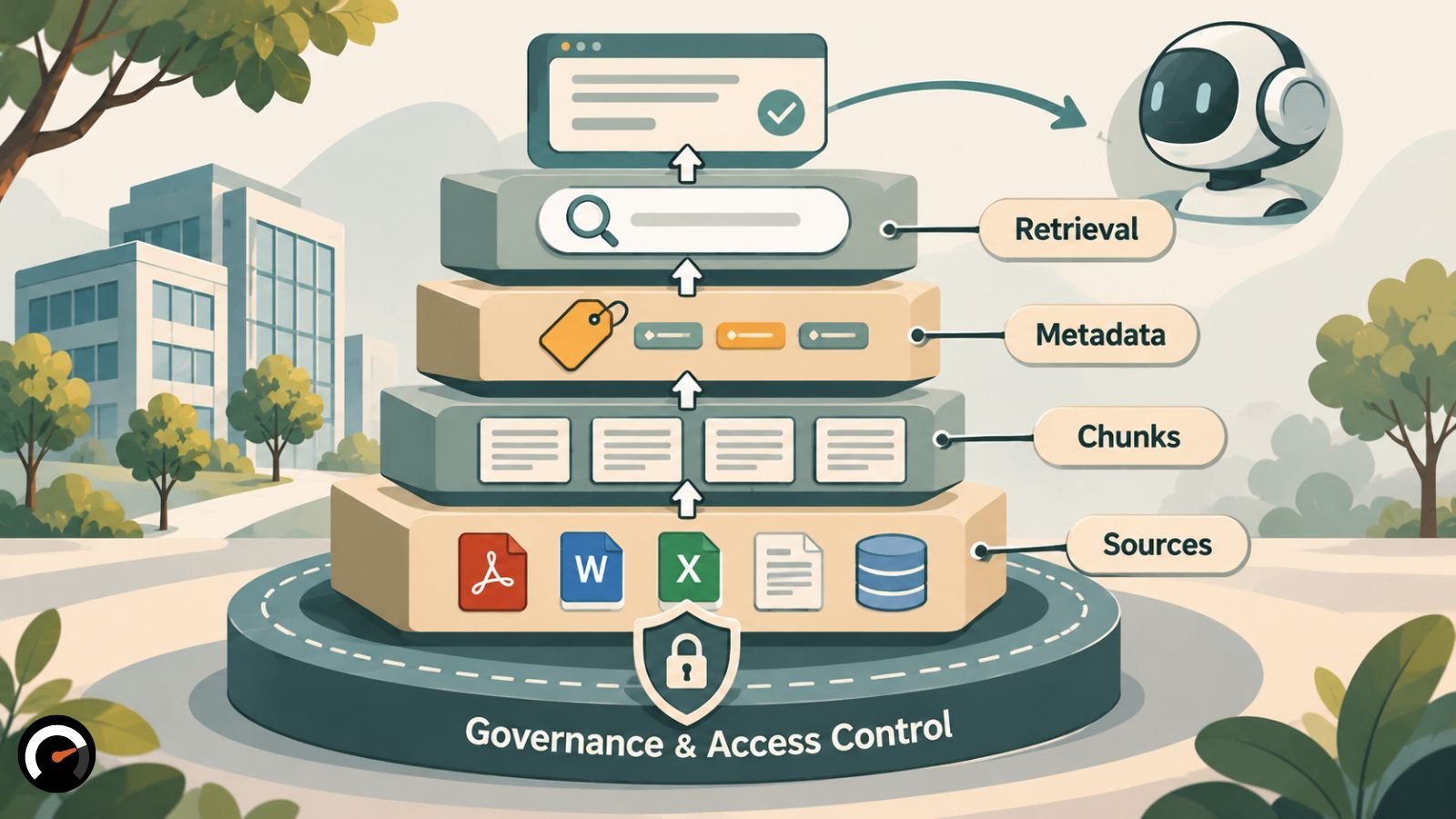
In plain terms, it’s a governed collection of company content, prepared so an agent can find the right passage, check who’s allowed to see it, and cite where it came from. People rarely browse it. Software does, which is why structure, labels and permissions count for far more than page design.
The idea grows out of retrieval-augmented generation (RAG), which Lewis and colleagues laid out in their 2020 paper Retrieval-Augmented Generation for Knowledge-Intensive NLP Tasks. RAG lets a model look things up at question time instead of leaning only on what it learned in training. Agent knowledge bases push that into systems that call tools and take actions, which is how AI agents work in the first place.
Picture four layers stacked on each other. At the bottom sit the source documents: policies, manuals, tickets, contracts. Those get cut into chunks, and every chunk carries metadata such as owner, version, date, audience and sensitivity. On top, an index and its search logic match chunks to questions. Named owners, permissions and review dates hold the whole stack together.
Knowledge base vs. agent memory
People mix these two up a lot. A knowledge base is shared company content that the organization keeps current. Agent memory is what one agent picks up as it works, like a user’s preferences or where an earlier task left off. Plenty of production agents run both. This guide sticks to the shared document layer, and Step 6 covers the cases where an agent should query structured records directly.
When can you skip retrieval and put everything in the prompt?
Sometimes you don’t need retrieval at all. If the whole knowledge base fits comfortably in the model’s context window, put it in the prompt and move on. Anthropic’s September 2024 write-up drew the line at about 200,000 tokens, or roughly 500 pages, and noted that prompt caching makes this route faster and cheaper. Context windows have grown since, so check what your model allows today.
That shortcut holds up when the content is small, rarely changes and is fine for every user to see. Lose any one of those and you’re back to retrieval. Content that outgrows the window needs search. Content that changes weekly needs a way to re-index. Mixed audiences need permission filters.
There’s a running cost, too. Shipping the full corpus with every request adds tokens and latency to each call, so measure both before you commit.
The enterprise knowledge base building methodology at a glance
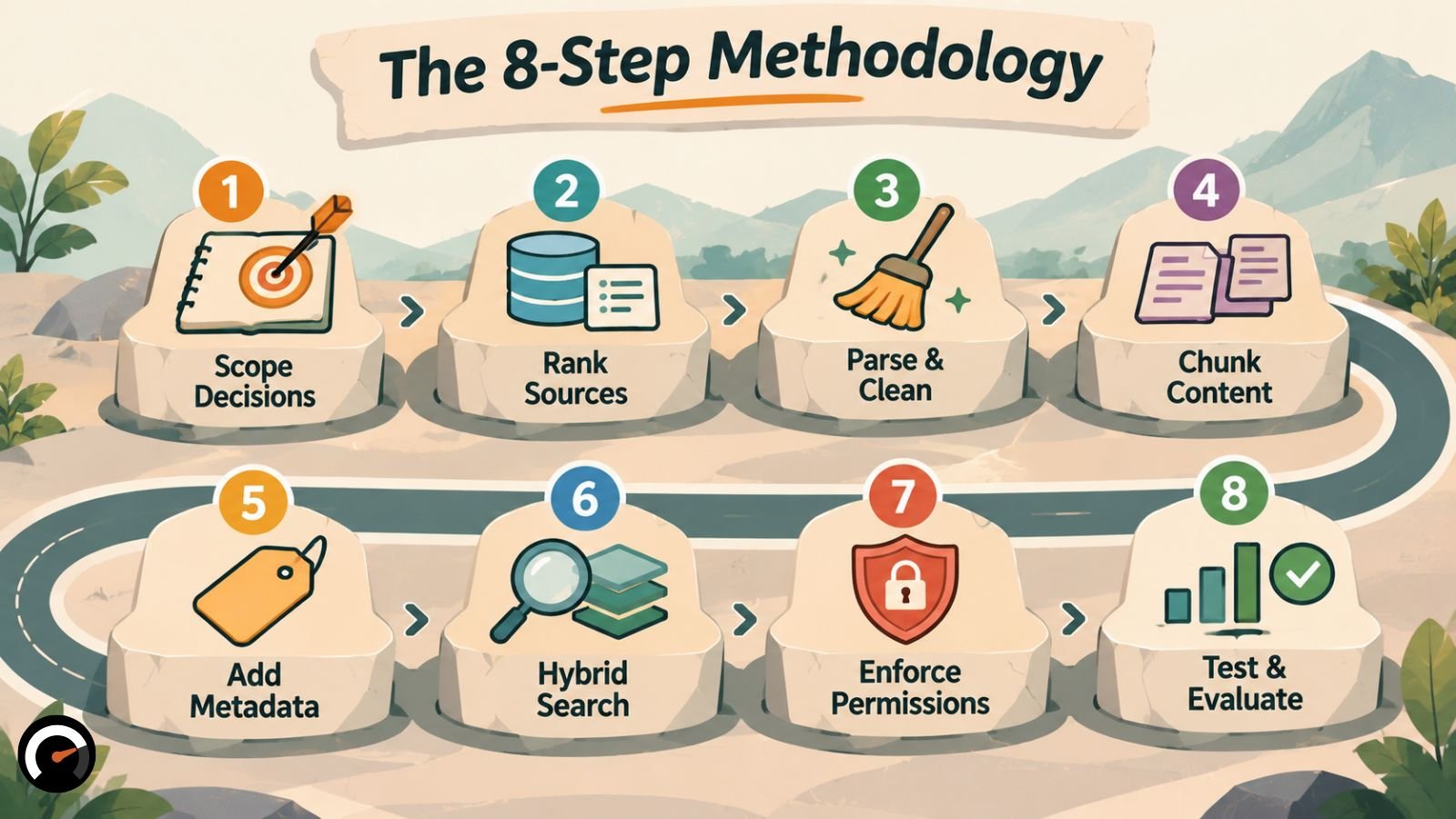
Once you launch, a maintenance loop sends test failures and real user misses back to whichever step caused them.
| Step | Question it answers | What breaks when you skip it |
|---|---|---|
| 1. Scope decisions | What must the agent know to do its job? | You index everything and answer nothing well |
| 2. Rank sources | Which documents hold authority? | Old and new versions conflict |
| 3. Parse and clean | Can software read these files correctly? | Tables and headings turn into noise |
| 4. Chunk | Where do ideas start and end? | Answers split across chunks |
| 5. Enrich | What does each chunk need to make sense alone? | Chunks lose the document they came from |
| 6. Retrieve | How does the agent find the best chunks? | Exact codes or meaning slip through |
| 7. Secure | Who may see what? | Content leaks across teams or tenants |
| 8. Evaluate | Does it work on real questions? | You guess instead of measure |
Step 1: Define the decisions the agent makes
Start with the job, not the document pile. Write down every decision the agent makes, the questions each decision raises and the content that answers them. That list defines what goes into the knowledge base. Later, it becomes your test set.
Take an internal HR agent. It needs the leave policy, the payroll calendar and the benefits terms. Last year’s marketing decks? No. Every extra document is one more chance for the retriever to surface something irrelevant.
Pull the questions from real places: support tickets, chat logs, a short conversation with whoever answers them now. Next to each one, note the correct answer and the document it lives in. Keep it in a spreadsheet. You’ll need it again in Step 8.
One more decision belongs here. What should the agent do when retrieval comes back empty or shaky? It can abstain, ask a clarifying question or hand off to a person. For an agent that issues refunds or edits records, that choice carries real weight, and it’s part of the broader call on augmentation versus full automation.
Grow the scope from real agent failures
A March 2026 preprint called Demand-Driven Context flips the usual order. Instead of curating everything upfront, you hand the agent real problems, let it ask for the context it’s missing, and add only what it needed to succeed.
The authors tried this with an incident-management agent in retail order fulfillment. Nine cycles produced a reusable knowledge base of 46 entities. They suggest 20 to 30 cycles might be enough for one domain role, but they offer that as a hypothesis they haven’t tested yet.
Step 2: Choose your sources and rank them by authority
A source earns its place if it has a named owner, a clear update path and real authority over its topic. Rank what you keep, so the agent knows who wins an argument. A signed policy beats a slide deck every time. Content nobody maintains stays out.
Log a few facts about each source as you go: owner, home system, last review date, sensitivity and intended audience. Those details turn into chunk metadata in Step 5 and permission rules in Step 7.
Every source you add also brings new conflicts and a bigger attack surface, so settle who’s allowed to add content. OWASP’s RAG Security Cheat Sheet recommends an allowlist of trusted sources, a provenance record for every document and an approval step before a new source enters the ingestion pipeline.
Step 3: Parse, clean and verify documents before indexing
Good parsing keeps headings, lists and tables intact, strips out duplicates and boilerplate, and grabs metadata in the same pass. Everything downstream only ever sees the text you produce here. A parsing mistake doesn’t stay put. It rides along through chunking, embedding and retrieval.
Scanned PDFs, slide decks and complicated tables cause most of the grief. Don’t trust the parser blindly. Open a sample of the output for each file type and read it yourself.
Then go looking for near-duplicates. If five versions of one policy sit in the index, the retriever has five chances to pick the wrong one. Keep the current version and mark or delete the others.
Finally, treat every incoming file as untrusted until someone has checked it. The OWASP cheat sheet calls document poisoning the most common RAG attack and puts the rule bluntly: retrieved content is data, not commands. An agent should never act on instructions tucked inside a retrieved passage, a trick known as indirect prompt injection.
Step 4: Chunk along document structure, then test alternatives
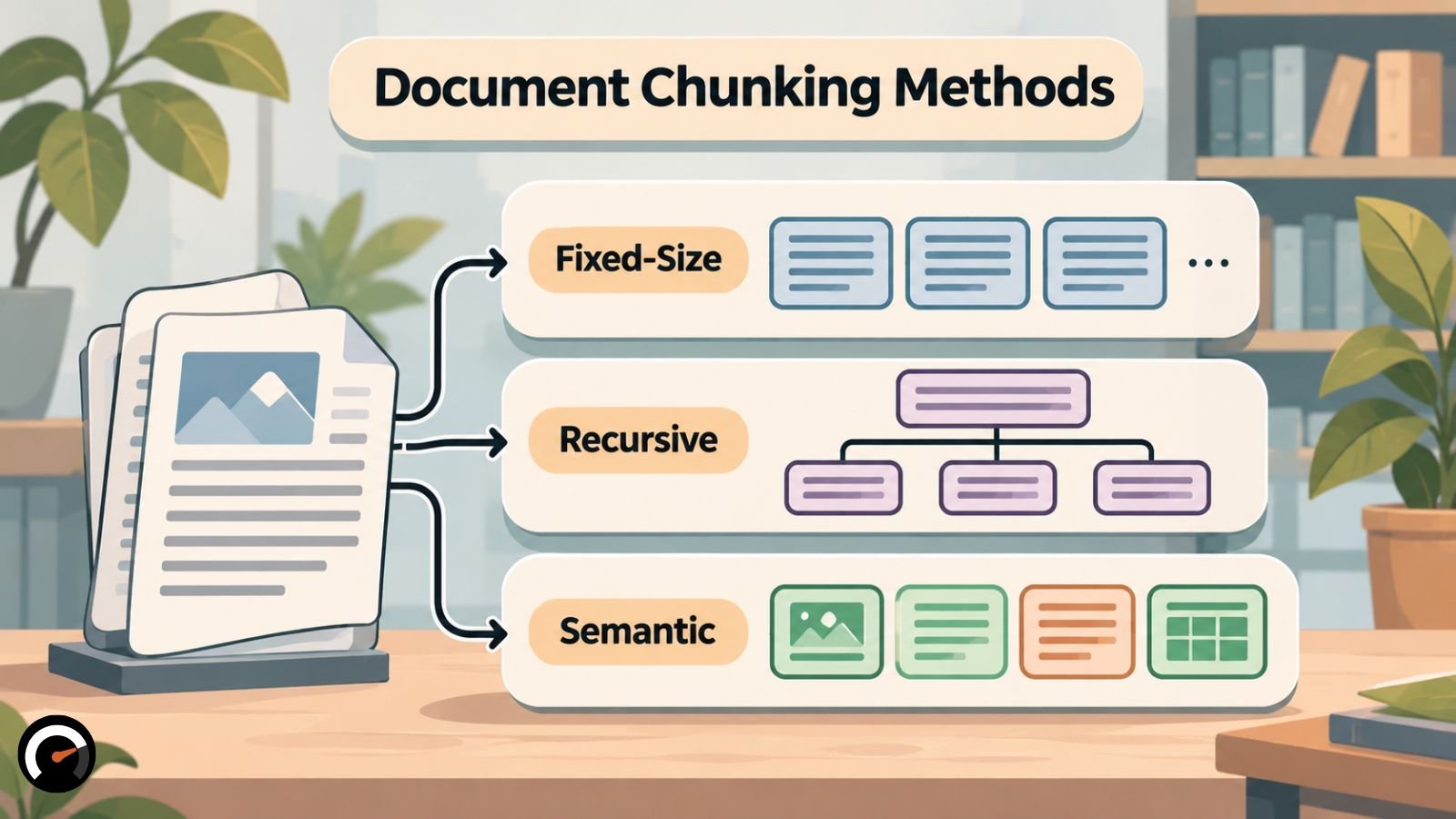
No chunking method wins everywhere. Split along each document’s own structure first, then run two or three variants against your Step 1 questions and see which one holds up.
The most useful controlled test so far comes out of the University of Illinois Chicago: A Systematic Framework for Enterprise Knowledge Retrieval. First posted in December 2025, it was revised in March 2026 after acceptance to the IEEE CAI 2026 conference. The team paired three chunking methods with three embedding approaches and ran 100 queries against AWS S3 documentation.
| Chunker | Setting | Result on AWS S3 documentation |
|---|---|---|
| Fixed-size | 1,024-length chunks | Best ranking quality (NDCG@10 of 0.813) when metadata was written into the chunk text |
| Recursive | 512 tokens, 128-token overlap | Most stable across embedding setups; the authors’ default for unfamiliar corpora |
| Semantic | Splits where meaning shifts | 39% more chunks (5,706 vs. 4,099) without beating the simpler methods |
Don’t copy those settings wholesale. The study covered just one well-structured domain, and the authors expect messier documents to favor semantic chunking. Its relevance labels also came from a reranking model rather than human reviewers. Whatever splitter you choose, keep tables in one piece.
Step 5: Give every chunk context and metadata
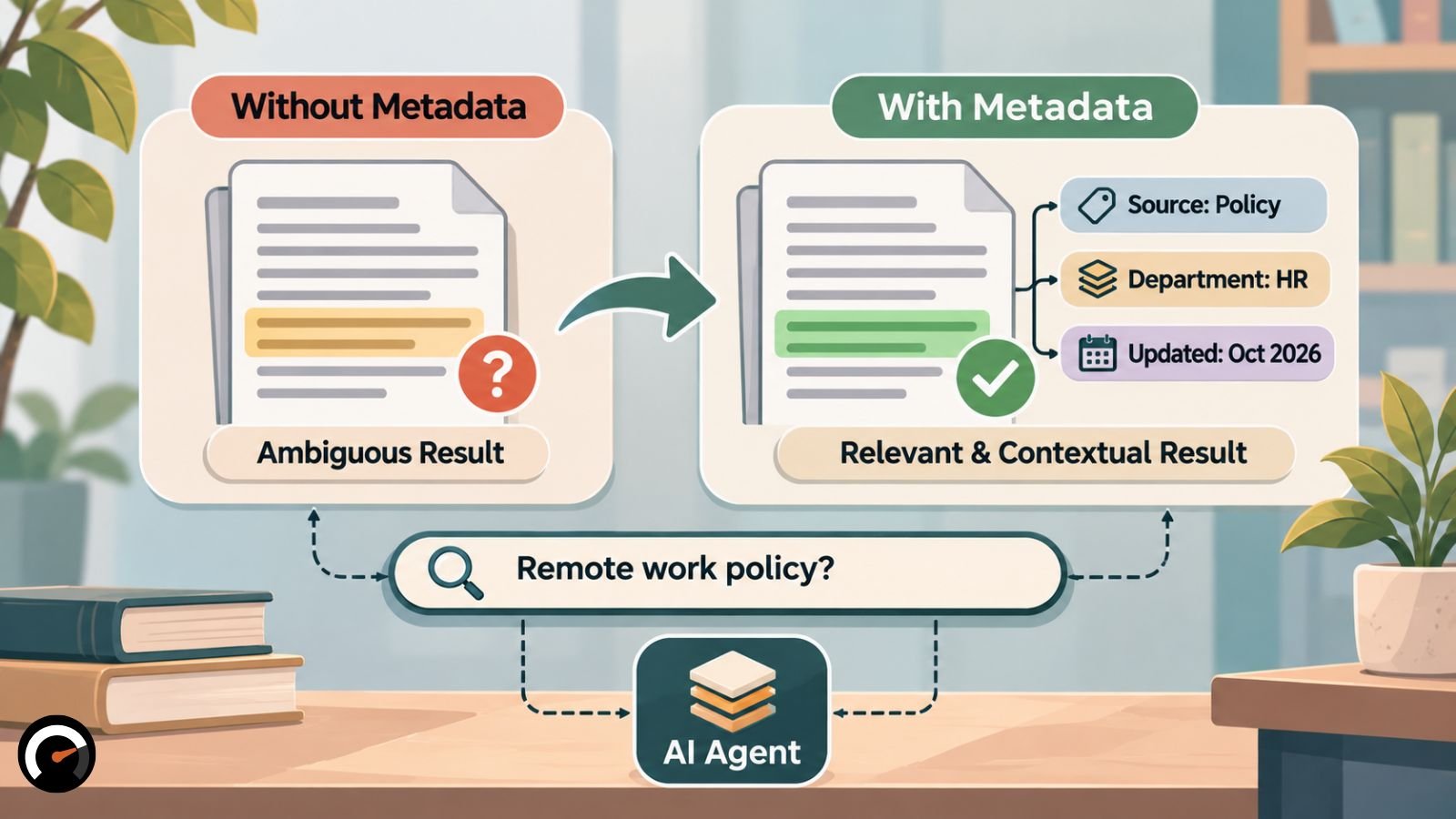
Every chunk needs two things added: a line of context saying where it sits in the source document, and the metadata fields you recorded in Step 2. Strip both away and a retrieved line like “revenue grew 3%” stops telling you whose revenue, or which quarter.
Contextual Retrieval: added context cut failed retrievals by 35% to 49%
Anthropic’s Contextual Retrieval method has a model write 50 to 100 tokens of context for each chunk, then sticks that text on the front before embedding and before building the BM25 keyword index. The contextual embeddings alone cut the top-20 retrieval failure rate from 5.7% to 3.7%, a 35% drop. Adding contextual BM25 pushed it to 2.9%, or 49%.
One caveat on those numbers. Anthropic tested on codebases, fiction, arXiv papers and science papers. No policies, no contracts. Enterprise content may behave differently.
Context isn’t free to generate, either. Anthropic estimated $1.02 per million document tokens, assuming prompt caching, 800-token chunks and 8,000-token documents. Model prices have moved since then, so redo the math for your own corpus.
Structured metadata works best in small doses, written into the text
The UIC study saw something similar with structured metadata. On semantic chunks, adding full metadata lifted NDCG@10 from 0.615 to 0.699, a 13.7% gain over the identical setup without it.
The more useful finding is about method. Writing metadata into the chunk text before embedding beat blending in a separate metadata vector afterward. When the authors did blend, they tried 20%, 10% and 5% weights, and the heaviest finished last in every chunking setup.
Anthropic’s context prefix works the same way. So two independent tests now lean toward one habit: put context straight into the chunk.
Step 6: Search with hybrid retrieval, reranking and routing
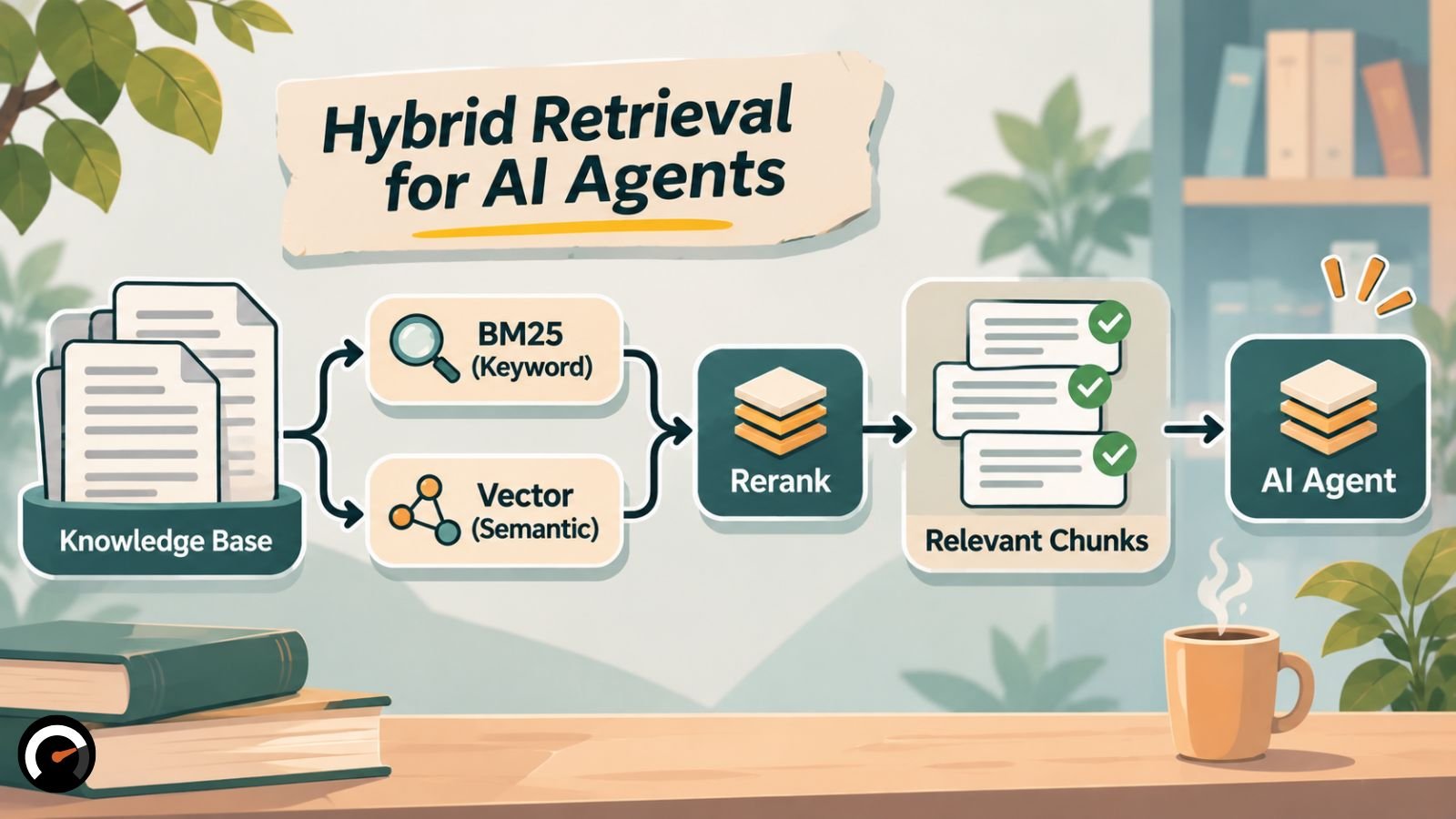
Use both kinds of search. Semantic search handles meaning, while BM25 keyword search catches exact strings like product codes, error codes, and policy numbers that embeddings tend to blur.
Anthropic’s tests back this up. Embeddings plus BM25 beat embeddings alone. Its full pipeline then added a reranker, which rescored the first 150 candidates and passed only the top 20 to the model. With everything combined, top-20 failures fell from 5.7% to 1.9%, a 67% cut.
Be careful with the 49% figure from Step 5, though. It bundles two changes: context and keyword search. If you already run hybrid search, you’ve banked part of that gain. Anthropic does report that context helped every embedding setup it tried.
A reranker adds a step at query time, so time it in your own stack. Sending fewer chunks to the model can win some of that back.
How many chunks should reach the model?
On this question, the two best sources disagree. Anthropic tried 5, 10 and 20 chunks and did best with 20. OWASP’s cheat sheet suggests 3 to 5 chunks, 2,000 to 4,000 tokens in total, to limit how much injected text can flood the context window.
It’s accuracy against exposure. For an agent that takes actions, start near the OWASP range and widen it only if your tests show answers missing evidence.
Route numeric questions to structured data
Some questions shouldn’t go to text search at all. Revenue, prices and stock levels live in databases and systems of record. Pull a number out of prose and it can come back paraphrased, from the wrong table or from the wrong quarter.
A routing step fixes this, and it can be a simple rule. Numeric and comparative questions go to a direct database query. Policies, procedures and explanations go to text retrieval.
Step 7: Enforce permissions before retrieval, not after
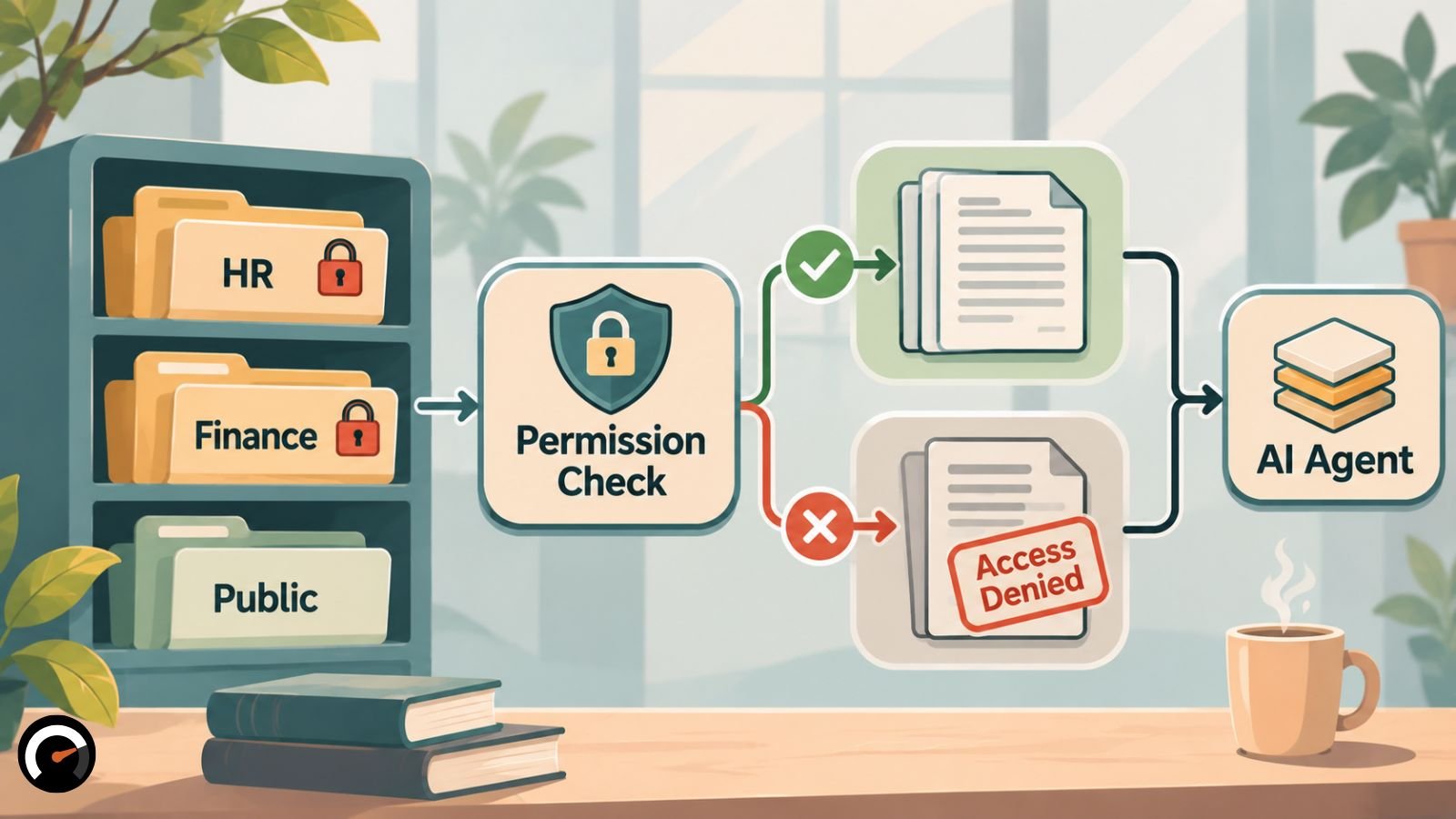
Permissions belong inside the retrieval layer, so the model never even receives content the user can’t see. The OWASP Top 10 for LLM Applications 2026, published August 4, 2026, tackles this risk from two sides. LLM02:2026 Sensitive Information Disclosure now names RAG chunk leakage outright. LLM09:2026 Vector and Embedding Weaknesses, listed as LLM08 in 2025, deals with leaks between users and tenants who share a vector store.
And don’t assume embeddings are anonymous. The OWASP cheat sheet notes that researchers have reconstructed text from them, so vectors need the same access controls as the documents they came from.
Filter at query time with chunk-level access metadata
Put access metadata on every chunk and apply it inside the retrieval query itself. The alternative, post-filtering, grabs everything and drops restricted results afterward. That can leave you with too few usable results. Worse, it leaks the similarity scores of restricted documents, which is why the cheat sheet calls pre-retrieval filtering the safer design.
A source document’s access rules have to carry down to every chunk cut from it. If an access check fails, return nothing at all, not a trimmed-down subset.
Keeping all of this in sync with the source systems is real, ongoing work. A filter that drifts from the source’s rules will eventually leak or block the wrong thing, like a file someone lost access to last week. Budget for it, since it’s one of the costs vendors leave out of agent quotes.
Check the requesting user’s permissions, not the agent’s
Here’s how this goes wrong. An employee asks an HR agent about a payroll record. The agent’s service account can read every payroll record in the company; the employee can’t. If retrieval only checks the service account, the agent hands the record over.
The fix is to pass the requesting user’s identity through to the retrieval layer. Giving each agent its own scoped identity still pays off for audit trails and revocation. Retrieval, though, should answer to the person asking.
Limit what the agent can do with retrieved content
The rankings tell their own story. Excessive Agency climbed to LLM03 in the 2026 list, up from sixth in 2025, and agents that plan and call tools now get a separate OWASP Top 10 for Agentic Applications, published in December 2025.
In practice, give the agent no more tool access than the user it’s serving. Payments, data deletion and external API calls should all wait for an explicit confirmation.
Return sources with every answer
Every answer should name the documents and chunks it drew on. OWASP’s cheat sheet recommends this for all RAG responses, and the payoff is practical. Users can check a claim, and when an answer goes wrong, whoever maintains the system can trace it to the exact retrieval behind it.
Step 8: Test retrieval and answers separately
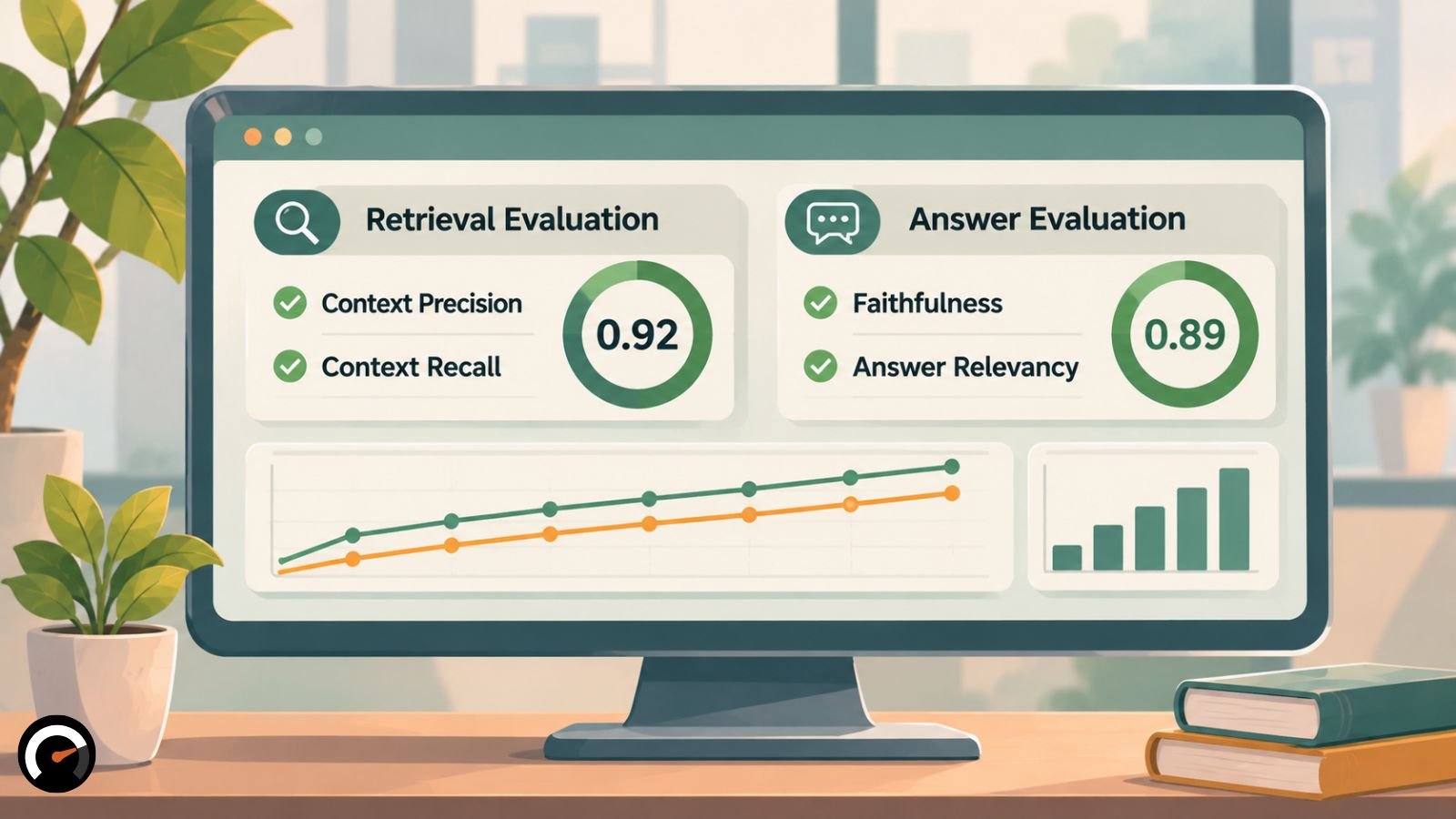
Score retrieval and answers separately, using the real questions you gathered in Step 1. A bad answer can come from bad retrieval, or from a model that ignored good retrieval, and one combined score won’t tell you which. Frameworks such as Ragas track four core metrics:
| Metric | What it checks | Needs a reference answer? |
|---|---|---|
| Faithfulness | Every claim in the answer is supported by the retrieved text | No |
| Answer relevancy | The answer addresses the question asked | No |
| Context precision | The retrieved chunks are relevant to the question | Usually not; some variants do |
| Context recall | The retrieved chunks cover everything the answer needs | Yes |
Notice what faithfulness actually measures: agreement with the retrieved text. An answer can be perfectly faithful to an outdated policy and still be wrong. That’s where Steps 2 and 3 earn their keep.
LLM judges also cost money and add noise, and the UIC authors warn that LLM-based quality scores are open to confounding factors. Spot-check a sample by hand.
Two habits save trouble later. Pin your Ragas version, because metric names shift between releases. And set the pass threshold before the first run. Pick it afterward and it has a funny way of matching whatever the results were.
Test cases to run before launch
Then turn the metrics into concrete checks. Several below come straight from the minimum red-team cases OWASP’s cheat sheet wants in every deployment pipeline.
| Test case | What to verify |
|---|---|
| Exact policy question | The correct source and passage come back |
| Ambiguous question | The agent asks for clarification |
| Conflicting policy versions | The current, authoritative version wins |
| Unauthorized document | No restricted content reaches the model |
| Revoked access | Previously accessible content no longer appears |
| Cached answer | A cached response never reaches a user with different access |
| Poisoned document | Instructions hidden in it are not followed |
| Missing information | The agent abstains or escalates |
| Action request | The agent uses only tools the user is authorized to use |
How do you keep the knowledge base accurate after launch?
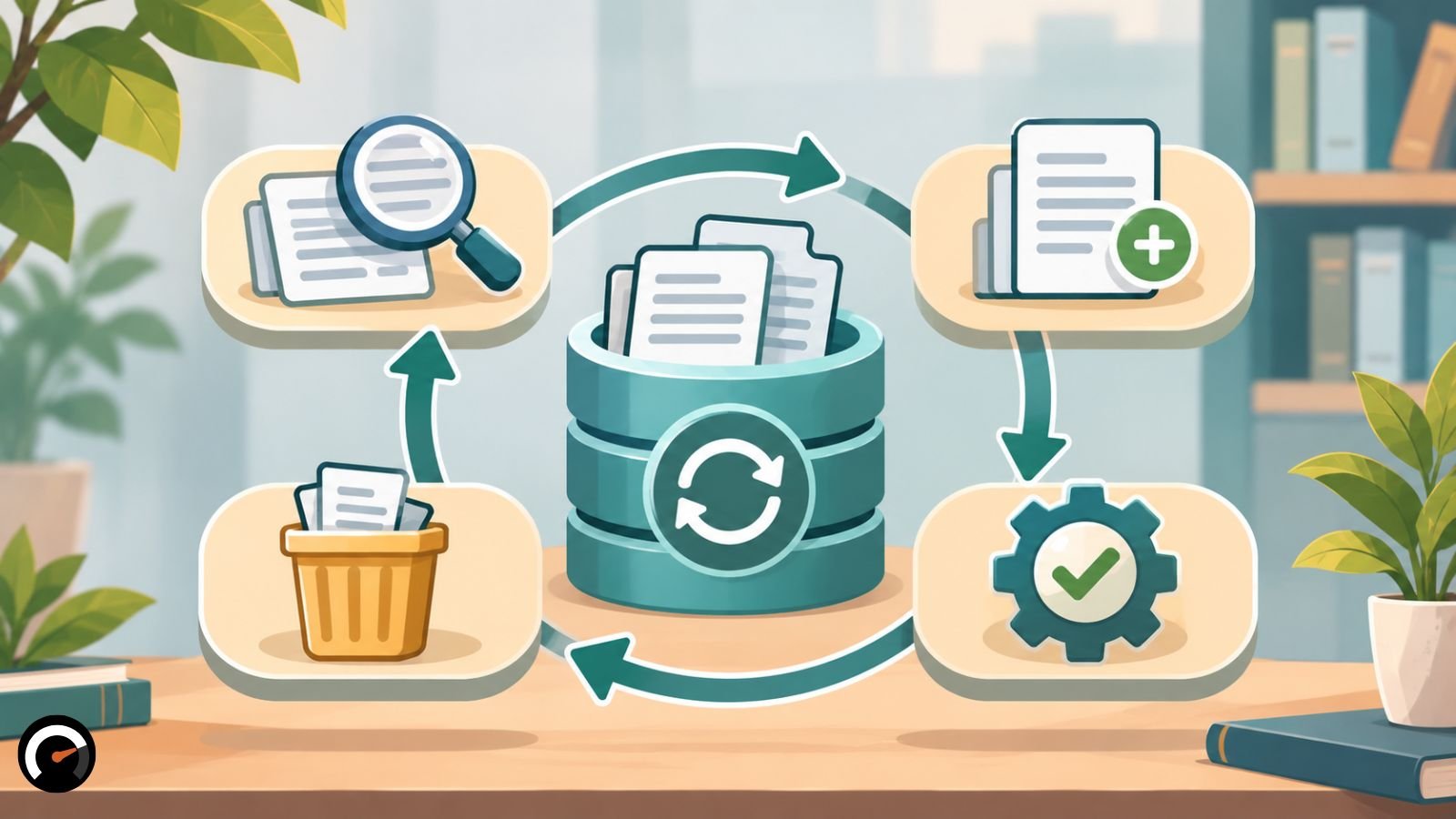
The work keeps going after launch. Give every source an owner and a review date, and rerun the test set any time sources, models or chunking rules change. When a real user hits a retrieval failure, log it like a bug and send it back to Steps 2 through 5.
Superseded documents get a status field so retrieval skips them. Questions that found nothing useful go into a log someone actually reviews on a schedule, and gaps that keep coming back become content fixes. It’s the same failure-driven loop from Step 1, just running in production.
Changes have to cascade, too. When a source is updated or someone loses access, OWASP’s cheat sheet calls for removing that source’s chunks, embeddings and cached responses together. Afterward, search for the old version and make sure it’s really gone.
To keep all of this traceable, give each chunk a source ID, version, effective date, last-modified date, review status, and a pointer to any replacement. An agent can’t be more current than the documents behind it.
What are the limits of this method and its evidence?
None of the numbers here come from original benchmarks. They trace to two places: Anthropic’s in-house Contextual Retrieval tests and the UIC study’s single-domain experiment, which used machine-generated relevance labels. Both are useful signposts. Neither promises the same gains on your documents.
The step order, the failure column in the overview table and the test scorecard are an editorial synthesis of those sources. No standards body publishes them, so bend them to fit your agent.
Check the 82.5% precision figure before repeating it
You’ll see “82.5% precision versus 73.3%” quoted in vendor content. It comes from the UIC study, and which version you read matters. The December 2025 original does report 82.5% precision for recursive chunking with TF-IDF weighted embeddings. In the March 2026 revision, that same setup scores 82.5% on hit rate but 63.0% on precision, even though the abstract still says 82.5% precision. The 73.3% belongs to a different setup altogether, semantic chunking with content-only embeddings.
Expect the ground to keep moving. RAG tooling, model prices, context limits and OWASP rankings all change, so recheck versions and prices before you commit budget.
Frequently asked questions
Q. What chunk size should I use for enterprise RAG?
There isn’t one size that fits every corpus. A sensible place to start is 512-token recursive chunks with a 128-token overlap, the most stable setup in the UIC study. Tune from there against your own questions.
Q. Do I need a vector database?
Not always. A small knowledge base can sit right in the prompt, and plenty of systems run fine on full-text search, a relational database or a managed search service. A vector index pays off when users ask by meaning rather than exact wording. If you add one, Anthropic’s results say to pair it with BM25.
Q. Which embedding models work best with Contextual Retrieval?
Anthropic says added context improved every embedding model it tested. Gemini and Voyage did best in those experiments, but newer models have come out since September 2024, so treat that ranking as dated.
Q. How do I stop an AI agent from exposing confidential documents?
Block it before the model sees anything. Filter by the requesting user’s permissions inside the retrieval query, keep access metadata on every chunk, and test by asking restricted questions as an unauthorized user. Telling the model in its prompt to keep secrets won’t hold, because by then it has already read them.
Q. How often should I update an AI agent’s knowledge base?
There’s no universal schedule. A price list might need a weekly look, while a code of conduct can go much longer between reviews. Match each source’s cycle to how often it changes, and rerun your tests after any change to sources, models or chunking rules.
Related: Should AI Agents Have Their Own Identity? The Hidden Security Risks
| Disclaimer: This article is for educational and informational purposes only. The methodology, research findings, and technical recommendations are based on publicly available sources and may not suit every enterprise environment. Organizations should independently evaluate security, data privacy, access controls, and system performance before implementation. This content does not constitute professional IT, cybersecurity, or legal advice. We are not affiliated with or endorsed by any companies, platforms, or research organizations mentioned. |
Test this on a real task
The audit is free and takes about ninety seconds. It returns a verdict, a readiness score and the supervision the task would need.
Run the audit